Maya Loaders Settings
Last updated Over 1 year ago
Loaded Products Outliner Colors
Setting Location:
ayon+settings://maya/load/colors
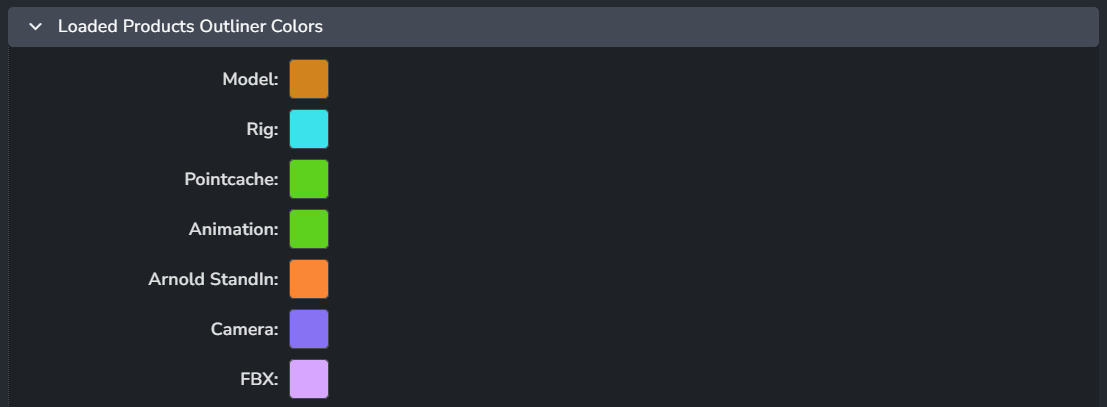
Set your preferred colors for the loader tool to highlight loaded products in Maya's Outliner.
Expect to see color boxes; clicking on them will bring up a color picker, giving you a range of colors to choose from.
Reference Loader
Setting Location:
ayon+settings://maya/load/reference_loader

Namespace
Group name
Display Handle On Load References
Import Loader
Setting Location:
ayon+settings://maya/load/import_loader

Enable: The default state of the plugin.
Namespace
Group name
Arnold Standin Loader
Setting Location:
ayon+settings://maya/load/ArnoldStandinLoader

Enable: The default state of the plugin.
Assembly Loader
Setting Location:
ayon+settings://maya/load/AssemblyLoader

Enable: The default state of the plugin.
Audio Loader
Setting Location:
ayon+settings://maya/load/AudioLoader

Enable: The default state of the plugin.
GPU Cache Loader
Setting Location:
ayon+settings://maya/load/GpuCacheLoader

Enable: The default state of the plugin.
File Node (Image) Loader
Setting Location:
ayon+settings://maya/load/FileNodeLoader

Enable: The default state of the plugin.
Image Plane Loader
Setting Location:
ayon+settings://maya/load/ImagePlaneLoader

Enable: The default state of the plugin.
Look Loader
Setting Location:
ayon+settings://maya/load/LookLoader

Enable: The default state of the plugin.
Matchmove Loader
Setting Location:
ayon+settings://maya/load/MatchmoveLoader

Enable: The default state of the plugin.
Maya Load USD to Maya Proxy Loader
Setting Location:
ayon+settings://maya/load/MayaUsdLoader

Enable: The default state of the plugin.
Use AYON Entity URI: Use the AYON Entity URI on load instead of the resolved filepath so that the AYON USD Resolver will resolve the paths at runtime. This should be enabled when using the AYON OpenUSD Resolver.
Multiverse USD Loader
Setting Location:
ayon+settings://maya/load/MultiverseUsdLoader

Enable: The default state of the plugin.
Multiverse USD Override Loader
Setting Location:
ayon+settings://maya/load/MultiverseUsdOverLoader

Enable: The default state of the plugin.
Redshift Proxy Loader
Setting Location:
ayon+settings://maya/load/RedshiftProxyLoader

Enable: The default state of the plugin.
Render Setup Loader
Setting Location:
ayon+settings://maya/load/RenderSetupLoader

Enable: The default state of the plugin.
VDB to Arnold Loader
Setting Location:
ayon+settings://maya/load/LoadVDBtoArnold

Enable: The default state of the plugin.
VDB to Redshift Loader
Setting Location:
ayon+settings://maya/load/LoadVDBtoRedShift

Enable: The default state of the plugin.
VDB to V-Ray Loader
Setting Location:
ayon+settings://maya/load/LoadVDBtoVRay

Enable: The default state of the plugin.
Vray Proxy Loader
Setting Location:
ayon+settings://maya/load/VRayProxyLoader

Enable: The default state of the plugin.
VrayScene Loader
Setting Location:
ayon+settings://maya/load/VRaySceneLoader

Enable: The default state of the plugin.
Xgen Loader
Setting Location:
ayon+settings://maya/load/XgenLoader

Enable: The default state of the plugin.
Yeti Cache Loader
Setting Location:
ayon+settings://maya/load/YetiCacheLoader

Enable: The default state of the plugin.
Yeti Rig Loader
Setting Location:
ayon+settings://maya/load/YetiRigLoader

Enable: The default state of the plugin.
Create Yeti Cache instance on load: When enabled, upon loading a Yeti Rig product a new Yeti cache instance is automatically created as preparation to publishing " "the output directly.
Ornatrix Rig Loader
Setting Location:
ayon+settings://maya/load/OxRigLoader

Enable: Toggle the loader on or off.
Create Ornatrix Cache instance on load: When enabled, an Ornatrix Cache instance is automatically created each time an Ornatrix rig is loaded into the scene, similar to how loading a character rig automatically creates the animation instance for publishing.