Launcher folder creation does not respect capitalization of folders in webui
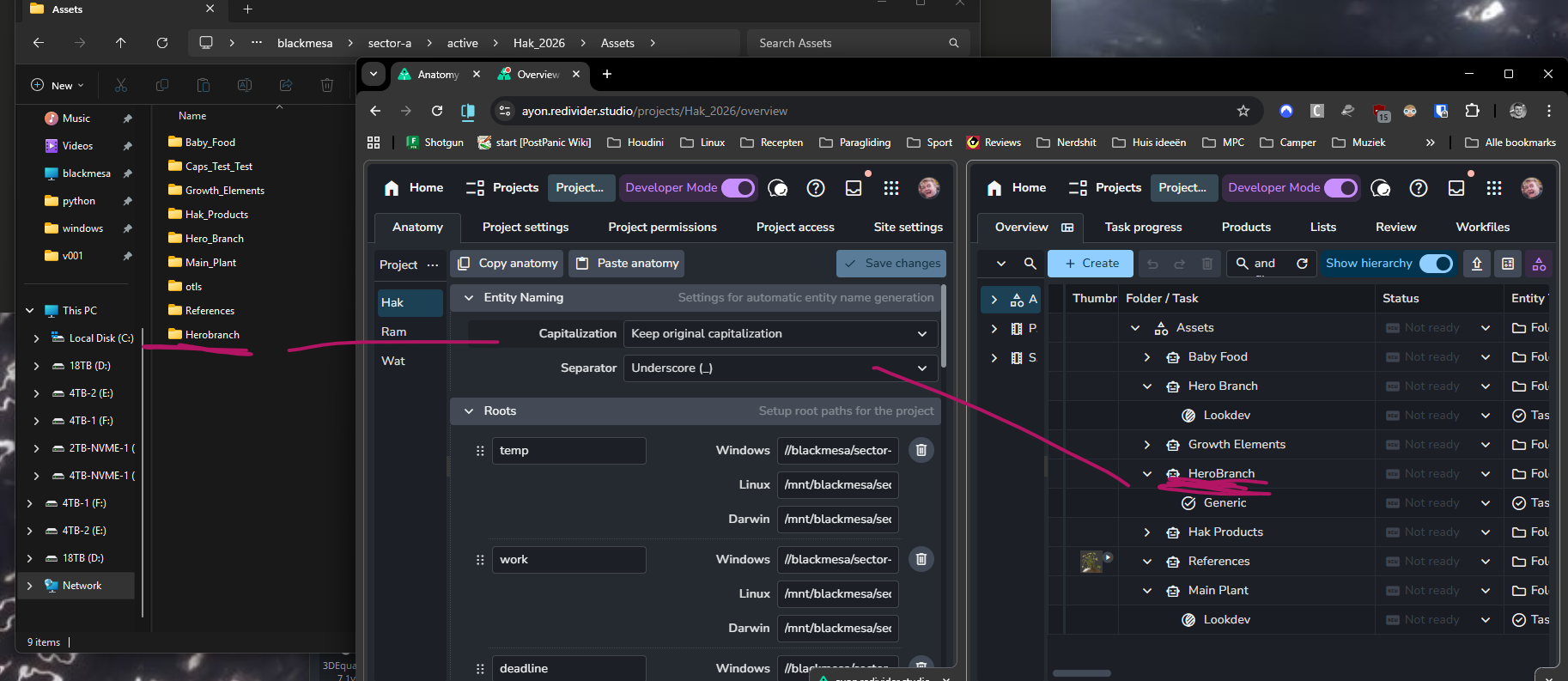
So our NAS has case sensitivity, I am using propietary tools to generate folders that support CamelCase formatting, the way that ayon creates folders on the disk when assets have CamelCase formatting removes any capitalisation except the first letter.
Here’s an example of the asset HeroBranch being formatted to Herobranch to disk, my own tools will still create a HeroBranch folder and this will clash. Would be awesome if ayon can respect the capitalisation of entities completely from site to disk.
Log in to comment and vote
Comments10
Mustafa Zaky Jafar
Thank you for pointing that out. so, this is and isn’t a bug at the same time. let me explain.
Firstly, you are pointing at the folder label not the name. the folder name can be found in the details panel.
About folder name in storage, it follows folder name as specified in the default template. which is mostly lowercased and spaces are replaced with underscores.
And there’s an issue indeed but on windows as it disregards letter case. so
CamelCaseis the same ascamelcase😶Dieuwer Feldbrugge
I get your point, from intuition’s sake there’s no reason why the label that you give a folder shouldn’t translate directly to its path unless you explicitly tell it not to, like I did in my studio anatomy, that it should respect the capitalisation, yet it doesn’t. Because seemingly it forgets the capitalisation.
I think it also should be set to the “respect current capitalisation” setting by default, if it would remember it, because why let users add data with certain customisations when they’re not allowed to commit it to the filesystem?
I’d argue it’s feels like an oversight, but I’m sure there is a good origin reason for it
Mustafa Zaky Jafar
You can see the generated name when creating folders on the AYON server.
I think the regex used is not exposed in studio settings.
Dieuwer Feldbrugge
Ah yeah you’d think that “keep original capitalisation” would be there as an option specifically to influence that, and it doesn’t work then. Or is that only meant for anything created in dccs instead of products from the webgui?
Mustafa Zaky Jafar
Let me expand a bit:
On AYON Server:
- creating project folders and tasks (on AYON server), the name is autogenerated from the label using an anatomy setting Entity Naming. sorry I forgot it’s configurable.
- Products published from pipeline, their names follows product name profile setting in code addon.
- Products uploaded from web UI as in Create Versions Without a Pipeline , the name field is editable. so, I guess it separate from the pipeline.
On your storage,
- folders creation follows your anatomy preset, which mostly use the folder names and paths.
- Products published from pipeline, they follow the product names.
- Products uploaded from web UI, these won’t make it to your storage, as currently we support only reviewables which are saved to the server itself.
Dieuwer Feldbrugge
@Mustafa Zaky Jafar has shown me how this works, I was misunderstanding how ayon works. When you type a folder name it actually shows what name it will bake into the database, which is different from the name it shows in the gui. Changing your capitalisation settings in your anatomy does not change this after the fact. I wasnt aware of this! Now I know i shouldnt expect the capitalisation feature to change the folder names in the database after the fact. It works fine once I knew that there’s this order of procedure to it!