December 5th, 2025
Server
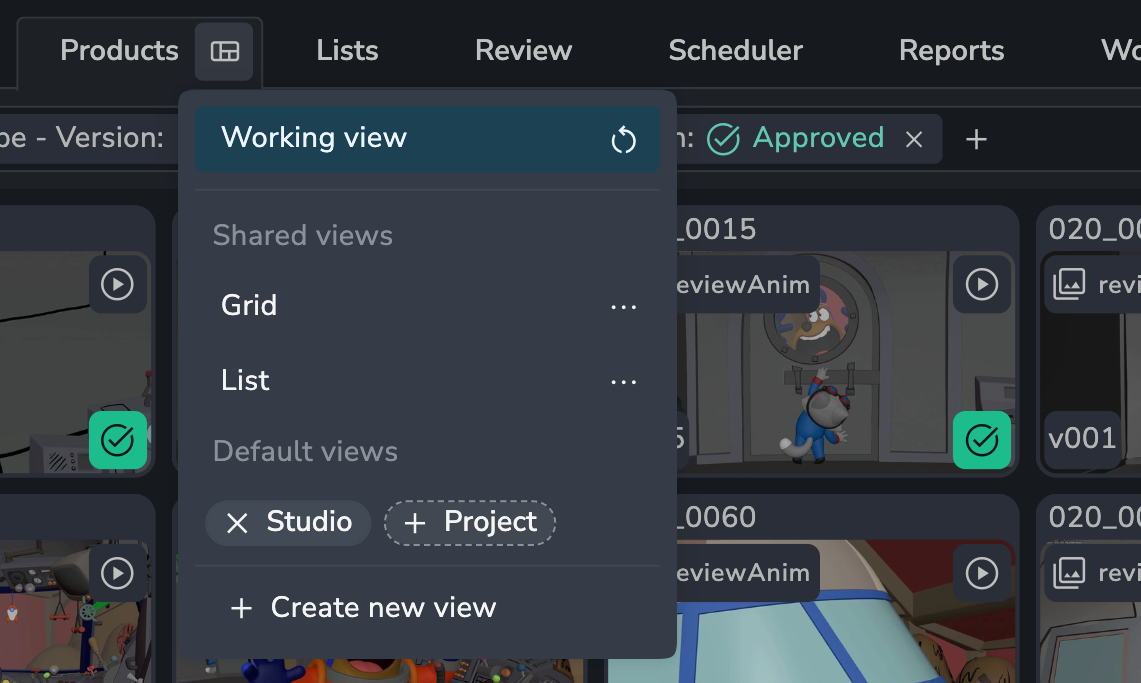
AYON 1.13.4 - Default Views
Admins can now set and manage a standardized default view for any page across the studio, providing a consistent layout for all users and a quick way to restore a known working state.
The feature supports defining a Studio Default to act as a universal fallback, and a Project Default to serve as a project-specific override.
Users can quickly apply the saved layout at any time via the Reset to default button. Only Administrators can manage these default configurations.
Setting a Project Default requires a Pro or Studio subscription.
Related Panel (Power Features 1.5.0)
The Related Panel is now available on the Tasks (Home) Page to provide immediate, contextual navigation between related work. This feature is part of the Power Features suite. Read more here.

❤️ Improvements
Project-level schemas for permission model #1666
Views: Default views #1649
Create empty review list #1683
Link types access control #816
🛠️ Fixes
📚 Resources
Note: Ynput cloud hosted instances have automatic, scheduled updates. Self-hosted servers require you to update yourself How to Update Your AYON Server.