AYON Review Processing
Last updated 5 months ago
Overview
AYON Review Processing handles the automated transformation of raw DCC output into playable, color-accurate media. This page outlines the default technical steps and the underlying tools used to generate reviewable files within the pipeline.
Review Steps During Publishing
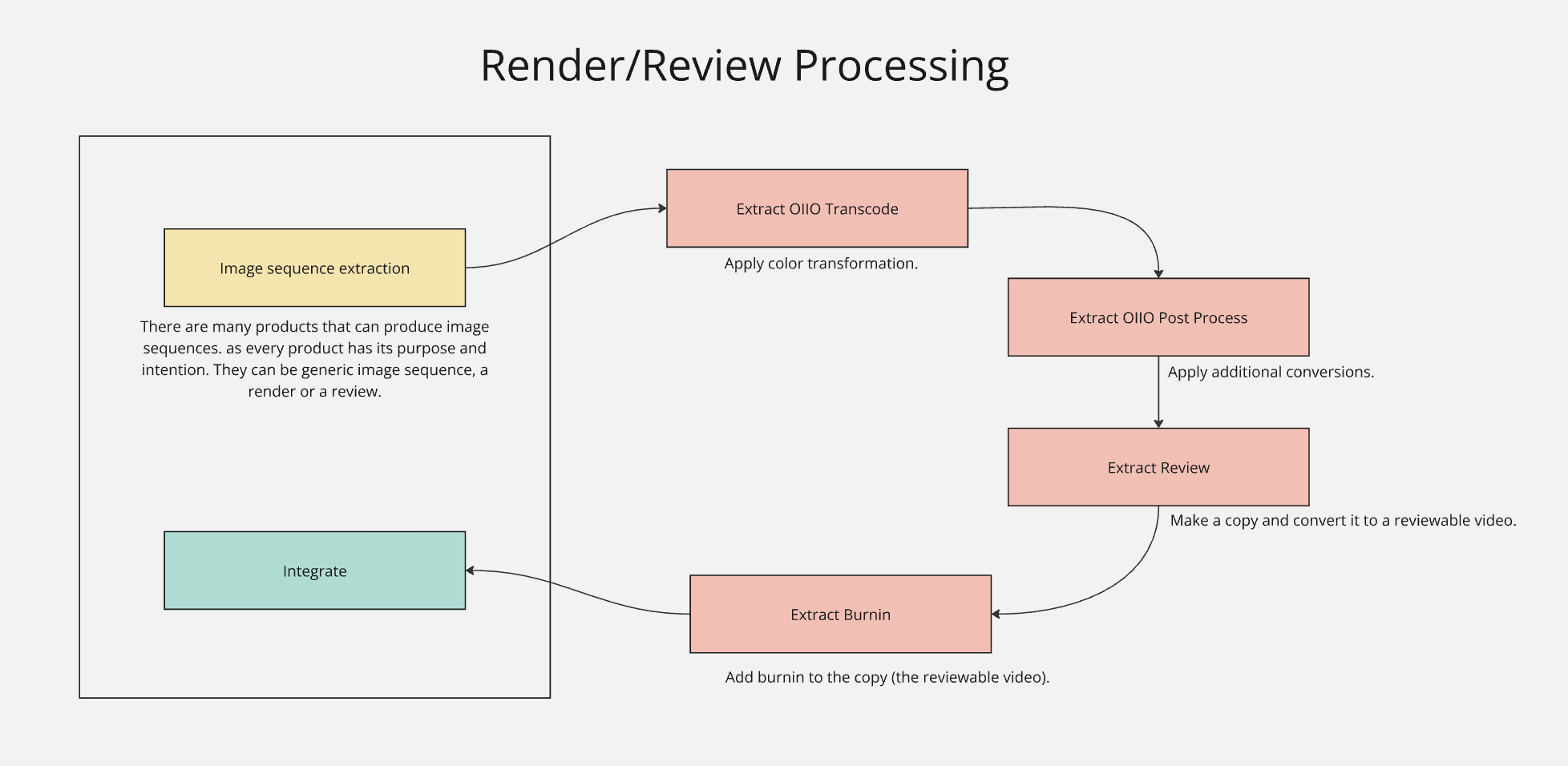
The processing pipeline typically consists of five abstract steps. These are implemented as Pyblish plugins that can be enabled, disabled, or customized based on project needs:
Media Generation: The DCC (Maya, Houdini, etc.) generates an image sequence or a movie file, such as a playblast, flipbook, or final render.
ExtractOIIOTranscode: Uses OpenImageIO to convert the sequence’s colorspace (e.g., from linear to sRGB/Rec.709).
ExtractOIIOPostProcess: A general-purpose transcoding step for additional image operations (resizing, cropping, etc.).
ExtractReview: Uses FFmpeg to encode the media e.g. into a video file like (H.264/MP4).
ExtractBurnin: Uses FFmpeg to overlay metadata text (e.g., Frame Number, Shot Name, Date) onto the video.
Reviewable Colorspace
If a DCC supports native OCIO color output, the ExtractOIIOTranscode step may be redundant. Conversely, it is essential for renderers that do not handle color management natively.
Review Steps Extensibility
Other addons can inject extra steps. For example, the Slater addon can identify a review representation and prepend a slate frame to the sequence before it is encoded.
Reviewable Data Flow: Pipeline vs. Server
Once processing is complete, the resulting file is published as a representation of the version.
Studio Storage: The reviewable file is saved to the physical storage defined in your project anatomy "Publish Roots”. See Project Anatomy.
AYON Server Upload: If a representation is tagged with
webreview(usually configured in theExtractReviewplugin), it is automatically uploaded to the AYON Server. This allows users to view the media directly in the AYON Web UI via The Details Panel or within Review Sessions.
Technical Reference
The review steps mentioned above depend on these tools under the hood:
FFmpeg: A command-line tool used to process audio and encode video files.
OpenImageIO (OIIO) / oiiotool: A command-line tool for image operations such as color space conversion, color mapping, resizing, and overlays. While highly reliable for color, it produces sequences rather than video files.
OpenColorIO (OCIO): A Python library providing the framework for consistent color management across the pipeline.
FAQ
How is a direct reviewable upload different from a pipeline publish?
As outlined in "Create Versions Without a Pipeline," direct uploads bypass the pipeline plugins. This means no transcoding, burn-ins, or automated color conversion are applied—the file you upload is exactly what appears on the server.
I published a reviewable, but the server says there is no reviewable file.
A reviewable file can be published to studio storage (pipeline) without being uploaded to the server. If the webreview tag is missing or the upload failed, the file exists on your local storage but will not be playable in the AYON Web Player.
Was this helpful?
Still need help? Ask the team