Attributes
Last updated 10 days ago
Overview
Attributes are the modular, customizable properties that define the "personality" of AYON entity.
Attributes are like variables, they add pieces of information to AYON entities. Attributes can store arbitrary data or essential information for the AYON pipeline to function properly.
The Attributes page is where you define and manage attributes across your studio.
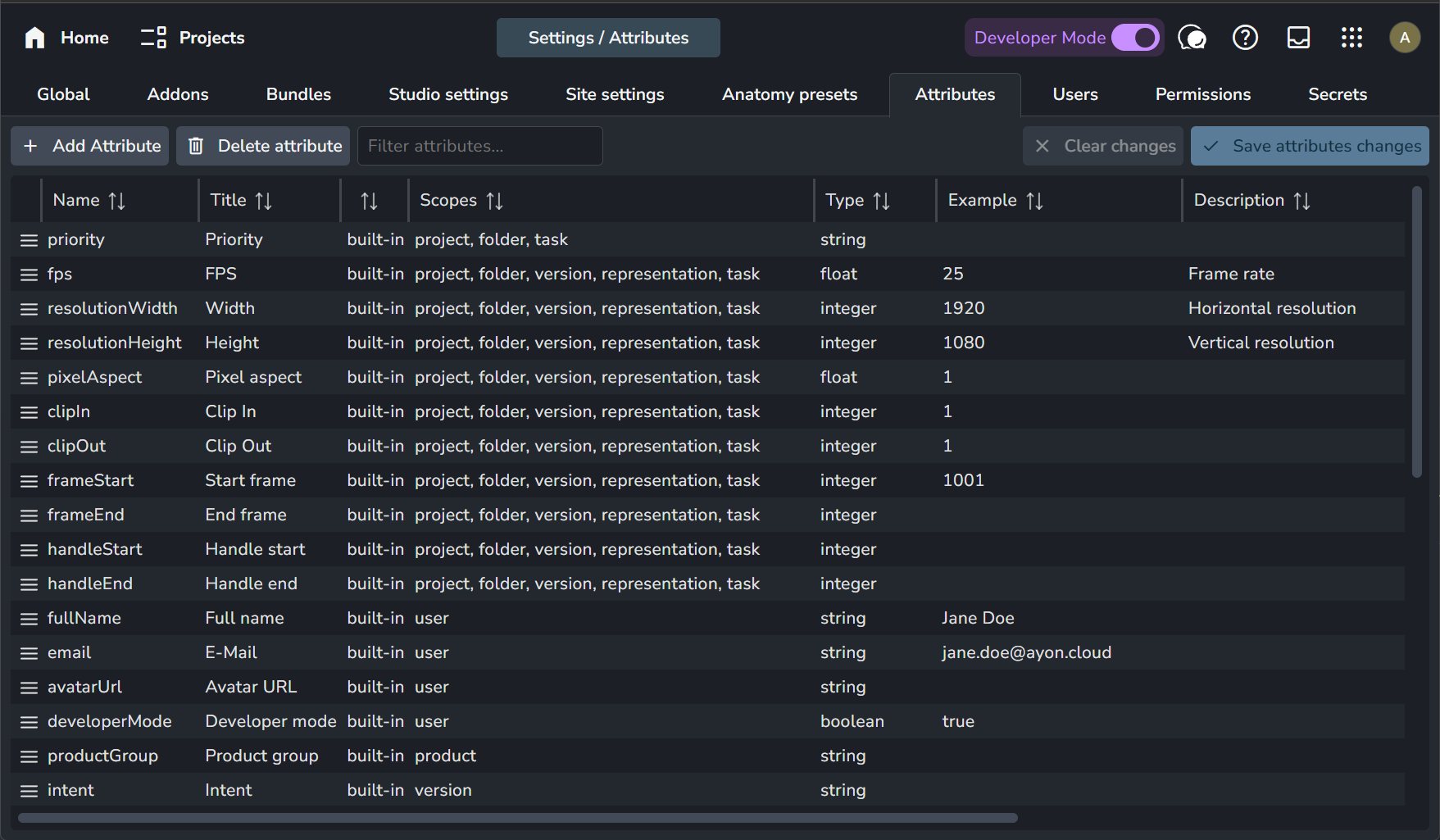
Attributes can only be managed at the studio level. It is currently not possible to manage attributes at the project level.
Attribute Scopes
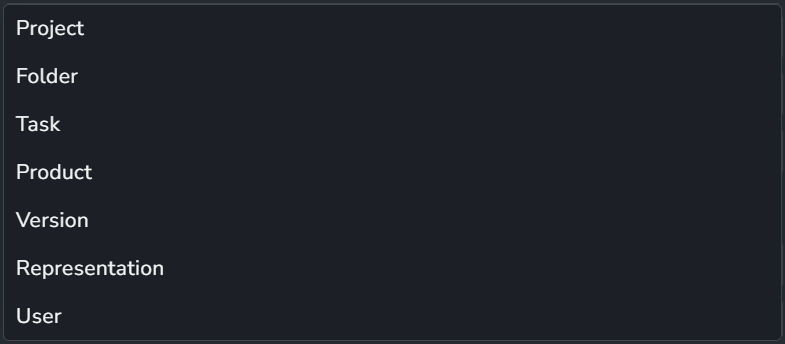
Scopes determine which type of AYON entity the attribute is added to:
List attributes are managed independently from the Attributes tab. They are defined and managed in the Lists tab, per project per list.
Attribute Types
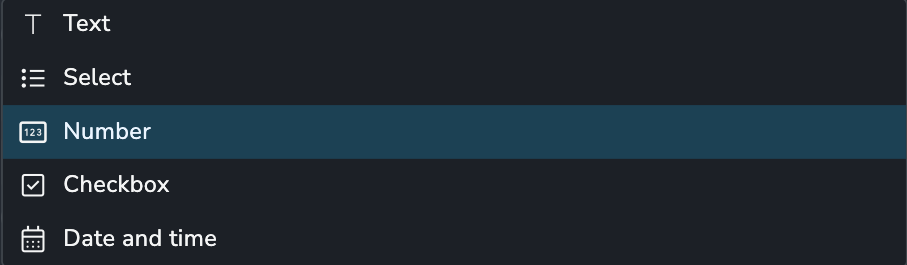
Attributes support the following data types:
Text (
string): A text value, e.g.,This is coolSelect (
stringorlist_of_strings): One or more values chosen from a list of options. Turn on Multi-select to allow several values (stored aslist_of_strings). With it off, a single value is stored (string).Number (
integerordecimal): A whole number, e.g.,1, or a decimal number, e.g.,3.166Checkbox (
boolean): A true/false value, e.g.,trueDate and time (
datetime): A timestamp, stored in UTC format, e.g.,2021-01-01T00:00:00+00:00
Attribute Source
Attributes can be added from various sources:
built-in: Defined by the AYON server and essential for AYON to function properly.You cannot delete built-in attributes, but you can modify their definitions. However, modifying built-in attributes may cause the pipeline or some AYON features to stop working correctly.
user-defined: Admin users can define custom attributes.defined by addons: Addons can define attributes. Avoid modifying these definitions, as changes may cause the addon to malfunction.
Manage Attributes
When an attribute is created, modified, or deleted, you’ll be prompted to restart the server for changes to take effect.

Add a New Attribute
Click the + Add Attribute button at the top left of the page. This will prompt a window where you can specify the new attribute’s definition.
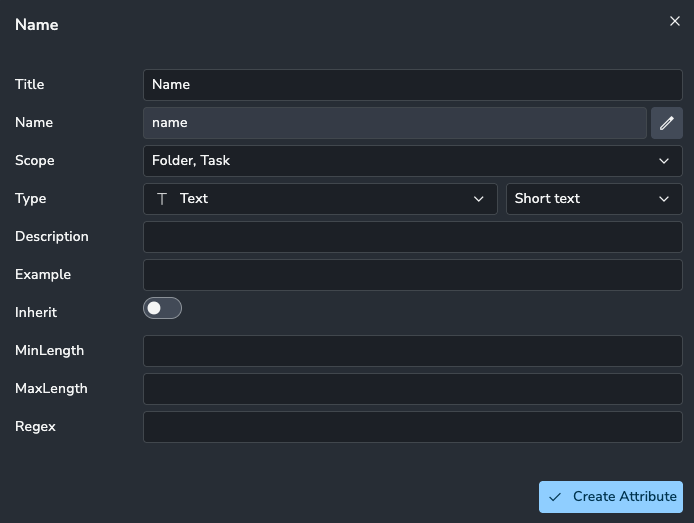
Attribute Definition Details:
Title: The label for the attribute.
Name: The internal name used by AYON. Once created, the name cannot be changed.
Scope: Select the AYON entity type to which this attribute will be added.
Type: Select the data type for this attribute (Text, Select, Number, Checkbox, or Date and time).
Description: A description of the attribute.
Inherit: Toggle to enable or disable attribute inheritance.
Additional Attribute Details: Additional settings based on the selected type, used to control and validate values.
Adding a Text Attribute
Text attributes have these additional details:
Min Length: Minimum value length.
Max Length: Maximum value length.
Regex: Pattern to validate the value.
Adding a Select Attribute
Select attributes let users choose from a list of options. They have these additional details:
Multi-select: When off, users can pick one option (
string). When on, users can pick several options (list_of_strings).Enum: The source of the options. Choose Custom to define your own list, or pick a dynamic enum to generate the options automatically. If the enum has no items, the attribute is a Select with no options to choose from.
Min Items / Max Items (multi-select only): Minimum and maximum number of options that can be selected.
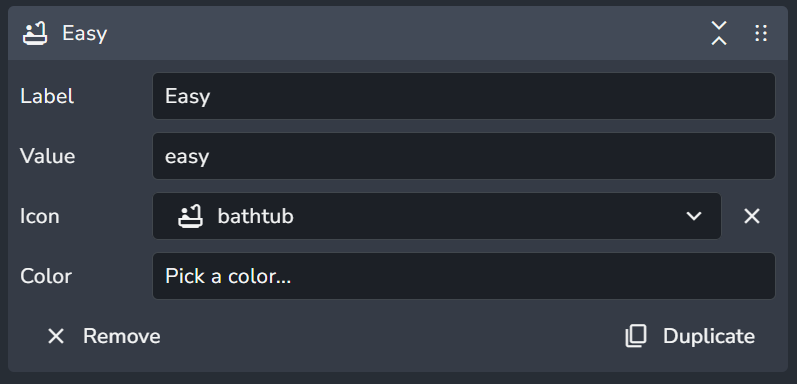
For a custom list, click + Add new item. Each item has a Label, Value, Icon and Color, and can be duplicated or removed.
Adding a Number Attribute
Number attributes have these additional details:
Decimal: Switch on to allow decimal values. When off, the attribute only accepts whole numbers.
Min: Minimum value.
Max: Maximum value.
For decimal attributes, you can specify whether the minimum is "greater than or equal to" and the maximum is "less than or equal to."
Adding a Checkbox Attribute
Checkbox attributes do not have any additional details.
Adding a Date and Time Attribute
Date and time attributes store a timestamp. They do not have any additional details.
Modify an Attribute
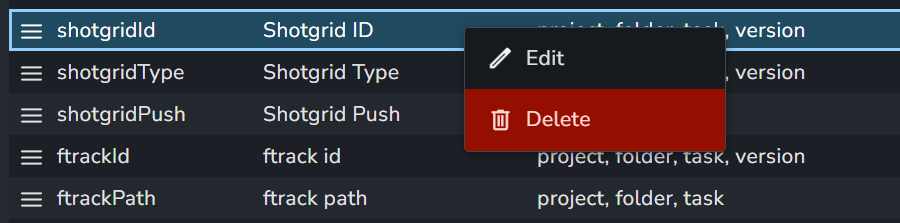
Right-click any attribute and choose the 🖉 Edit option to modify its definition. This opens the same window as Add New Attribute, but the attribute name is locked.
Remove an Attribute
Right-click any attribute and choose the 🗑️ Delete option to remove it.
Dynamic Enums
By default, the options of a Select attribute are a fixed list that you define yourself (the Custom enum). With a dynamic enum, the options are generated on the fly from data in AYON, so the list stays up to date without any manual editing.
For example, a Reviewers attribute on tasks can list every user in the system. When a new user is added, they appear in the list automatically.
Use a Dynamic Enum
Go to Studio Settings → Attributes and click
+ Add Attribute.Enter a Title, pick the Scope (for example, Task) and set Type to Select. Enable Multi-select if users should be able to pick more than one option.
Open the Enum dropdown. It defaults to Custom. Choose a dynamic enum instead, for example Users.
A preview shows the items that will be offered, along with any settings for the enum.
Click
Create Attribute, thenSave attributes changes, and restart the server so the attribute appears.Open the details panel of an entity in the chosen scope. The attribute now offers the dynamic list of options.
The options of some dynamic enums change depending on the project they are used in. The attribute dialog shows this: "The select options will change based on the project it is used in."
Built-in Dynamic Enums
AYON ships with these dynamic enums, ready to use:
Actions
Attributes
Folder Types
Link Types
Statuses
Tags
Task Types
Users
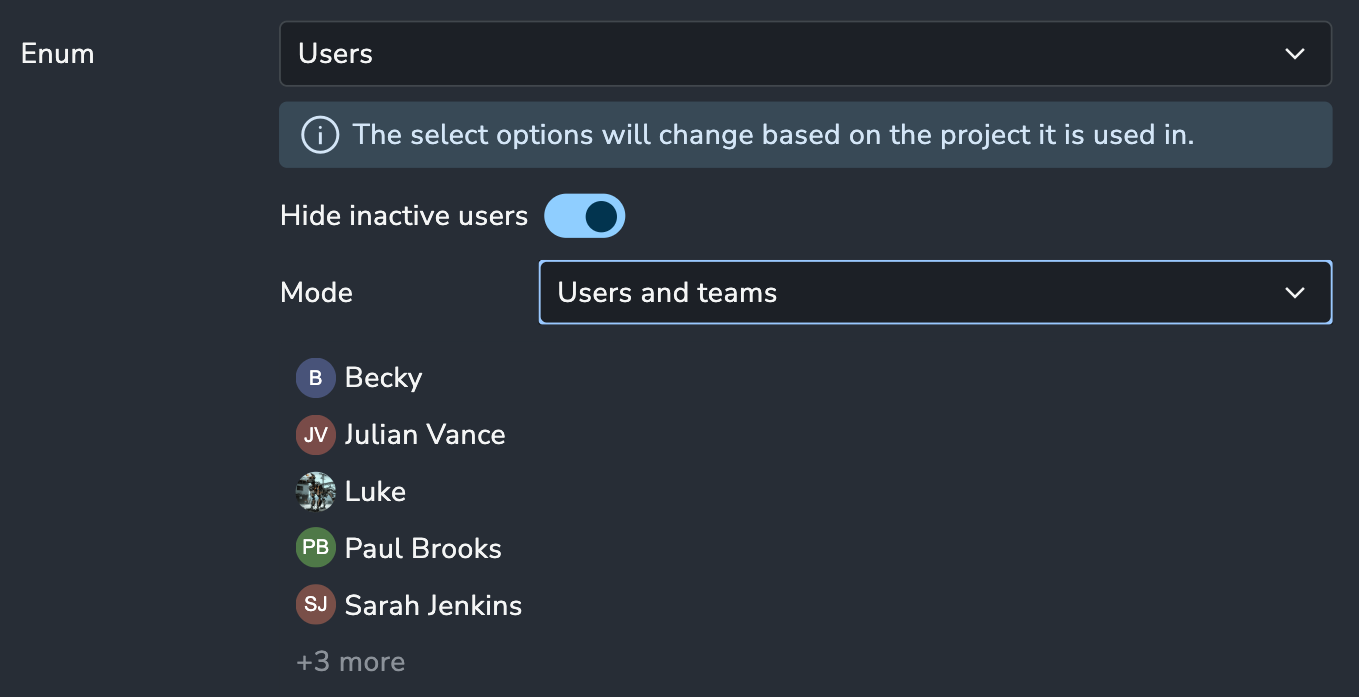
Users enum settings
Hide inactive users: Excludes inactive users from the list.
Mode: Choose whether the list contains Users, Teams, or both.
Preview and Debug
Click Debug under the preview to inspect how an enum resolves:
Context Params: Set values such as
userandproject_nameto see how the list changes in different projects.Form: The enum's settings (for example, Hide inactive users).
Enum Resolver Data: The enum's definition, including the parameters it accepts and its settings.
Item list: The resulting items, with a search field.
Dynamic Enums from Addons
Addons can define their own dynamic enums, and they appear in the same Enum dropdown. This makes them highly flexible. For example, an addon could list countries based on a region, or request options from an external service through an API.
Attributes and the Pipeline
For an attribute to be "visible" or "actionable" within the AYON pipeline (including loaders, publishers, and external sync tools), it must be explicitly defined in the Attribute Tab of the Server Settings. Attributes that are not registered on the server cannot be utilized by pipeline logic or stored within the database.
Therefore, AYON comes pre-packaged with essential attributes (e.g., frameStart, frameEnd, resolutionWidth, handleStart) that are used by almost every DCC integration.
When certain addons require custom metadata to function, the responsibility for creating those attributes is moved to the addon itself to streamline the experience. For example, the ftrack and Shotgrid addons automatically register specific attributes if they aren't already present; once these addons are used in your production, you will see new attributes on your server like ftrackId or shotgridId.
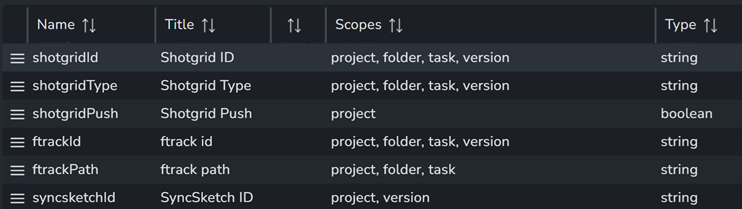
If you are developing a custom tool, script, or a publish plugin and you need to store data as an attribute, ensure you create the attribute first, either manually or via code. This prevents errors when attempting to access or write to an attribute that the server does not yet recognize.
Attributes and Permissions
Admins and Managers have unrestricted access to create, manage, and modify attributes across the server and pipeline. For standard Users, access is determined by their assigned access group (either the studio default or a project-specific assignment).
Restricting Access
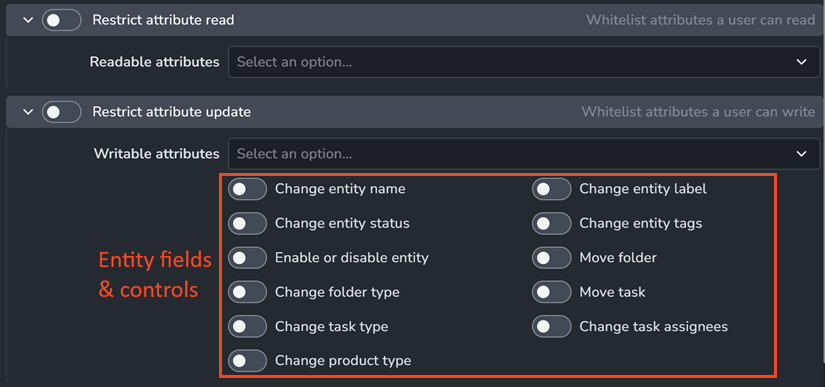
Within the Permissions tab of an Access Group, you have two primary options regarding attributes:
Restrict attribute read: Defines a "whitelist" of attributes from which the user is allowed to retrieve values.
Restrict attribute update: Defines which attributes a user is permitted to modify. It also sets permissions for allowed entity fields (such as Name, Label, and Status) and specific organizational controls, such as the ability to move folders or tasks.
Important Limitation: While useful for preventing accidental changes to key attributes (for example, disallowing standard users from modifying
frameStartandframeEnd), this setting can be quite restrictive. It implicitly limits access to fields not explicitly exposed in the UI, which may impact certain automated pipeline operations. Please report any incidents regarding this on our feedback portal.
FAQ
What is attribute inheritance?
Many attributes can be defined on multiple entities. In such cases, the child entity inherits the attribute value from the parent entity if the Inherit toggle is enabled in the attribute definition.
How do I set values for attributes?
Attributes are variables that extend AYON entity types. Values are set per entity:
Project attribute values can be set and modified as outlined in Modify Project Attributes.
Folder and task attribute values inherit project attributes by default and can be modified directly in the Project Overview Page or via the attribute button in The Details Panel.
Product, version, and representation attributes are set during publishing via the pipeline. These attributes can be modified programmatically using the AYON API.
Note: On the Products and Versions Page, you can override values for product and version attributes, but not for representations.
User attributes can be modified by each user via their account profile settings, and admins can set them in the Users tab.
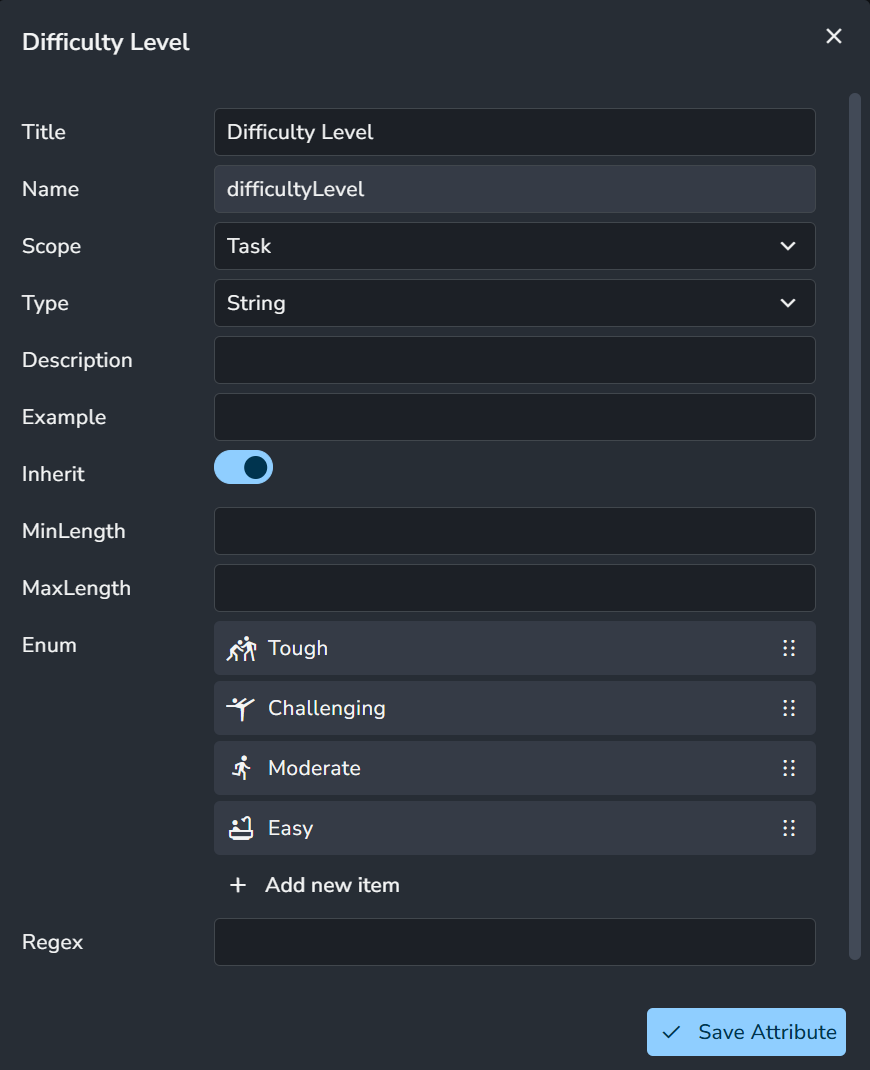
How to use enum in a Select attribute?
When creating or modifying a Select attribute, you can add enum items by clicking the + button.
Each enum item includes:
Label: Item label
Value: Item value
Icon: Icon for the item
Color: Color for the item
A string attribute for the task entity type with enum items is shown in the image below.
Selecting a value for a task entity is demonstrated in the image below.
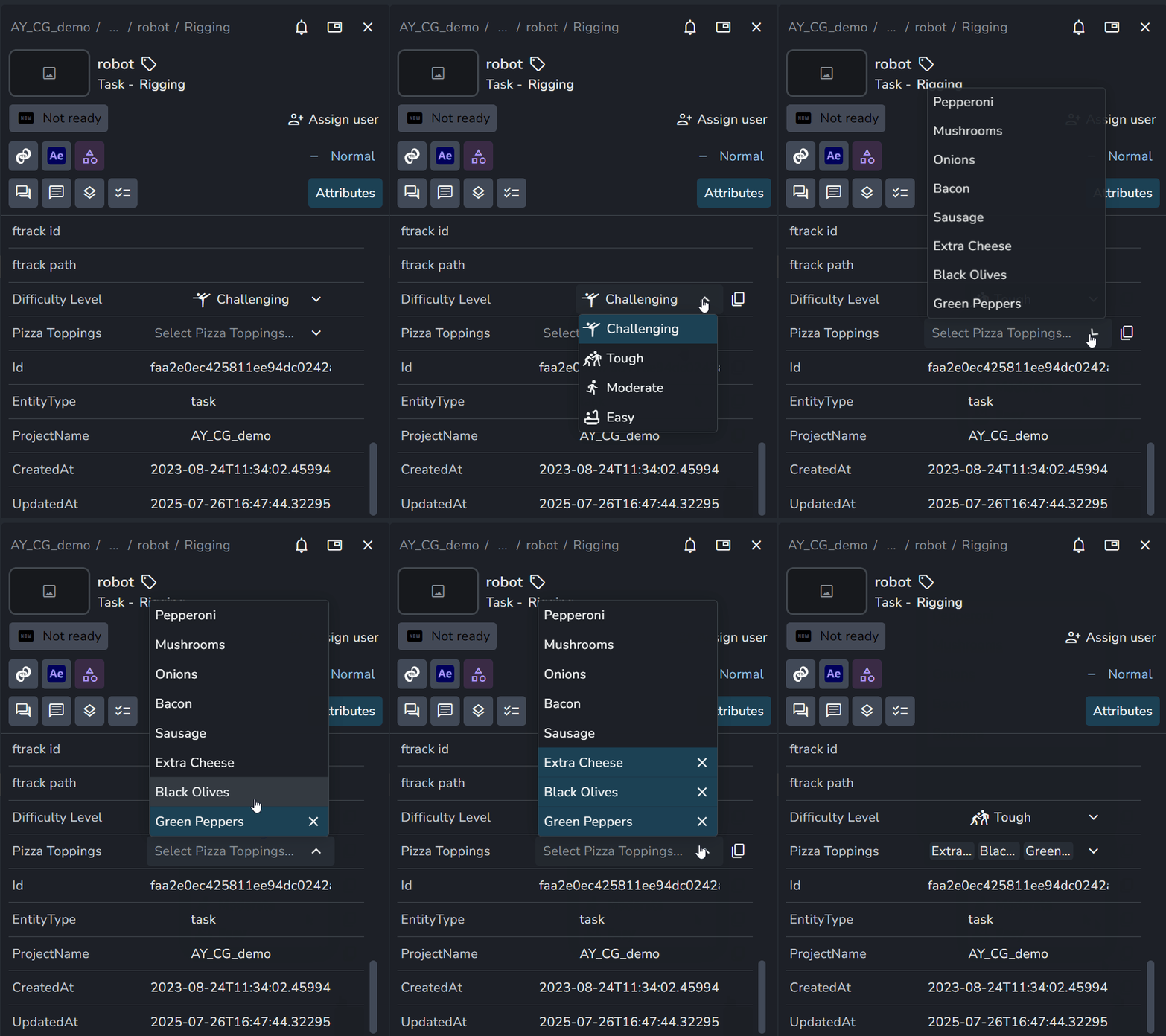
With Multi-select off, you can select one item.
With Multi-select on, you can select multiple items.
To generate the options automatically instead of listing them by hand, see Dynamic Enums.
Was this helpful?
Still need help? Ask the team