Project Bundles
Last updated 8 months ago
Overview
A Project Bundle is a unique, frozen environment assigned to a specific project. It allows a project to run on an immutable set of addon and launcher versions, independent of the studio-wide Production or Staging bundles.
This is critical for long-running projects that require a stable, consistent pipeline, protecting them from breaking changes when the studio updates its global bundles.
A Project Bundle is "frozen" but not "locked." You can still manually update individual addon versions when you have verified they are compatible with your specific project.
Minimum Requirements
To use Project Bundles, your environment must meet these specifications:
AYON Server: Version 1.14.1 or newer.
Base Bundle: An existing Production or Staging bundle containing:
AYON Launcher: Version 1.5.1 or newer.
Core Addon: Version 1.8.1 or newer.
Freezing a Bundle for a Project
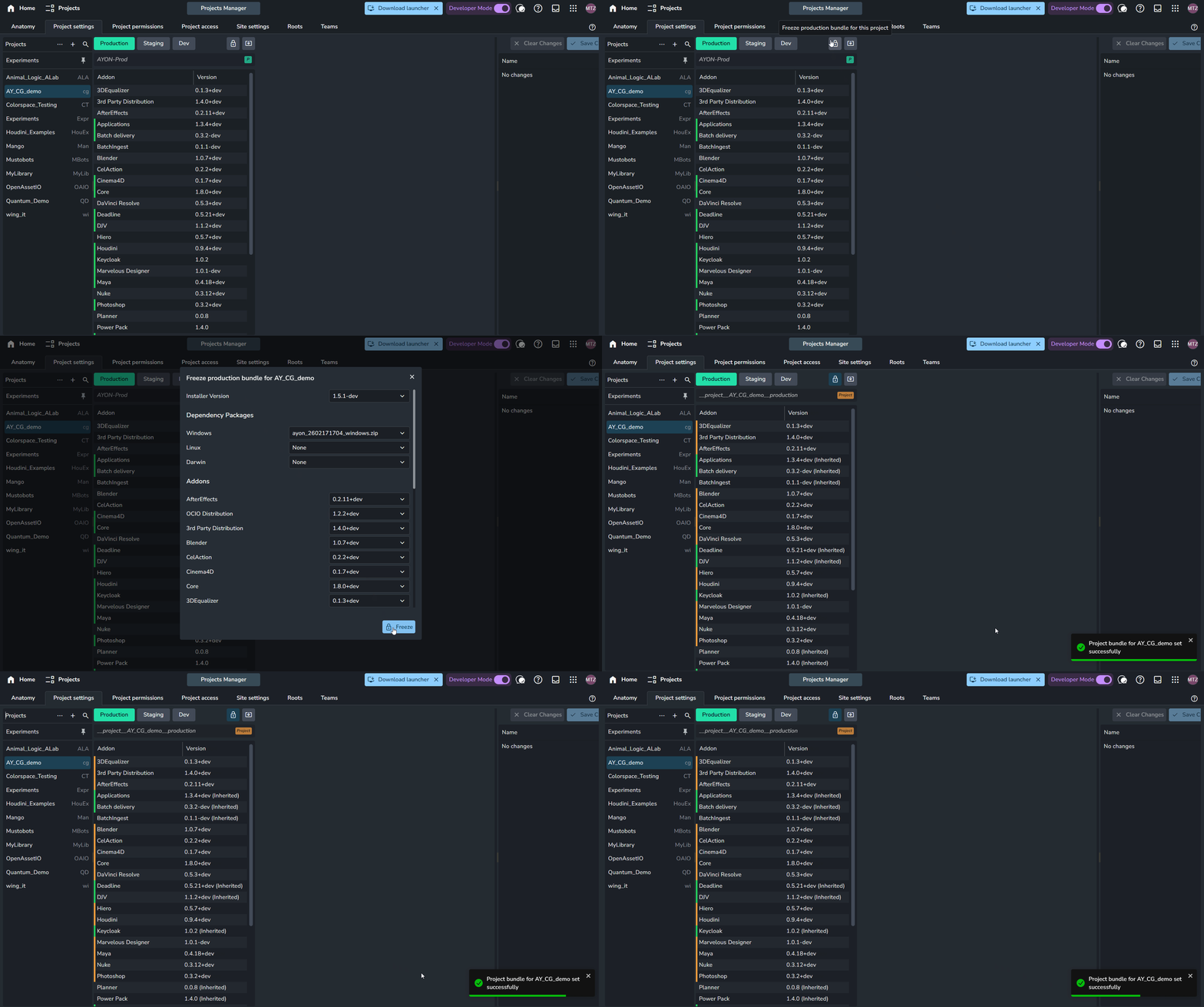
Creating or updating a project bundle is straightforward:
Navigate to Project Settings (
P+P).Select your project from the list.
Click the Lock Icon (Freeze Bundle) in the top toolbar.
The Project Bundle Dialog will appear. Here, you specify the launcher version, dependency packages, and the individual addon versions for the project.
Click Freeze button.
This button is renamed to Update Freeze if the project bundle for your project already exists. Click it to apply and save your modifications.
Once finished, AYON creates a unique bundle for your project (if one does not already exist) using the following naming convention: __project__{project_name}__{bundle_status} The {bundle_status} is determined by whether the source bundle was set to production or staging at the time of freezing.
You will also notice many settings turn orange, indicating they are now active as project-specific overrides within the project bundle.
The Project Bundle Dialog
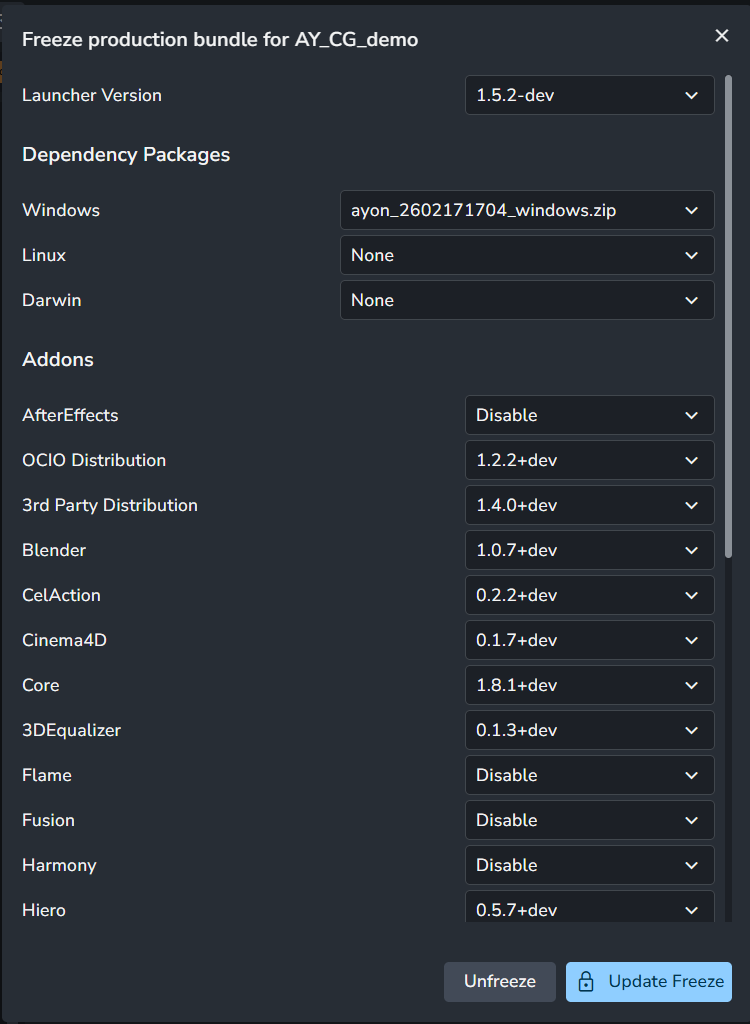
Clicking the lock button opens a configuration dialog where you can define:
Launcher Version: The specific AYON launcher build for the project.
Dependency Packages: The required platform-specific packages.
Addon Versions: Choose the specific versions for supported addons.
Addon Version Options:
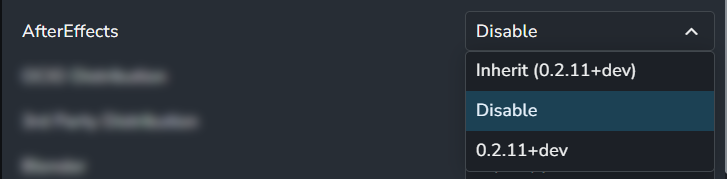
Inherit: The addon will continuously mirror the Production bundle. If the studio updates the Production bundle, this project's addon will update automatically.
Disable: Explicitly disables the addon for this project, setting its version to
NONE.Explicit Version: Locks the addon to a specific version, regardless of studio updates.
Viewing Project Bundles in the Bundles Tab
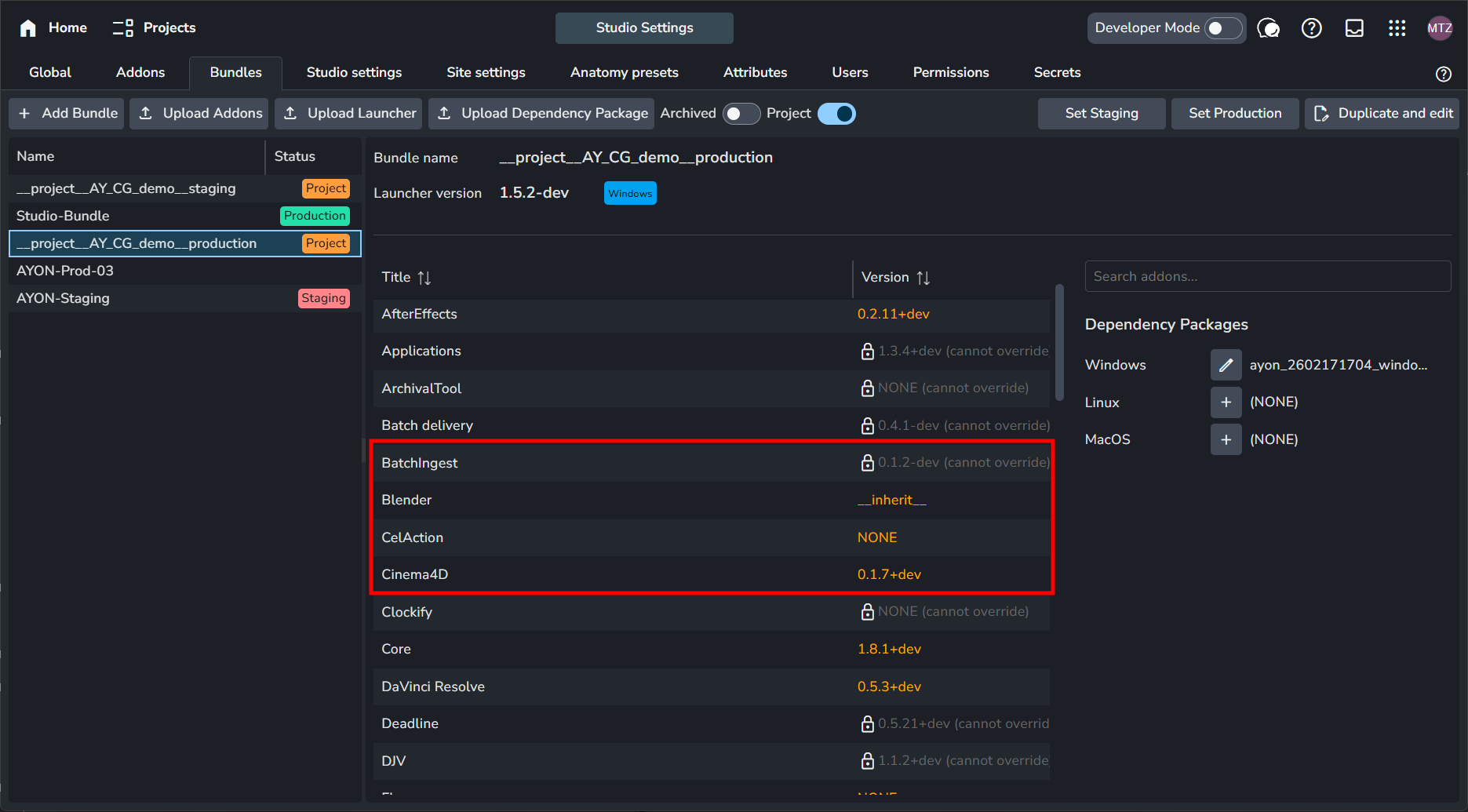
When viewing your Project Bundle in the Bundles tab, the UI distinguishes between supported and unsupported addons using specific colors and labels:
Supported Addons (Orange): These display the specific choice made in the freeze dialog (e.g., a specific version number,
NONE, orinherit).Non-Supported Addons (Greyed Out): These appear with a (cannot override) label next to the version name. These addons are implicitly set to inherit and will always mirror the versions currently active in the studio’s production/staging bundle.
Project Bundle Settings Behavior
Before deep dive, to learn about settings system in AYON, please refer to How are settings organized?
Studio Level (S + S)
Settings are linked to the Addon Version.
If your Project Bundle uses the same version of an addon as the Studio Production bundle, they share the same settings.
Changing a setting for that specific addon version at the Studio level will reflect in the Project Bundle, provided the versions match.
Project Level (P + P)
Project settings remain independent. Each project maintains its own overrides whether it is using a Studio bundle or a Project Bundle.
Consistency: Unfreezing a bundle does not delete your project settings; overrides remain intact within the studio bundle.
Primary Benefit: The main advantage of the Project Bundle is locking the code (Addon Versions). However, a Project Bundle is not required to lock project settings, as those are already locked by default when project overrides are in place.
Known Limitations of Project Bundles
Studio Bundle Propagation: For addons explicitly set to
__inherit__and non-supported addons (which are implicitly set to inherit), updates to the studio bundle are automatically reflected in the project bundle. This ensures these addons stay in sync with the studio standard, but it means their versions are not truly "frozen." Always verify their compatibility to avoid breaking changes.Disabling Non-Supported Addons: Because the dialog does not allow overrides for these addons, you cannot disable them directly in the Project Bundle.
Workaround: Create a temporary Production bundle with these addons disabled, freeze it for the project, and then delete the temporary bundle.
Compatibility Checks: AYON does not perform an addon compatibility check when creating or updating a Project Bundle. It is assumed the source bundle was already verified.
Development Mode: Project bundles are not supported in Development mode.
Was this helpful?
Still need help? Ask the team