Configure ftrack Addon
Last updated 5 months ago
ftrack addon is a bridge between ftrack project management tool and AYON. This documentation assumes that you are familiar with ftrack and its basic principles. If you're new to ftrack, we recommend having a thorough look at ftrack Official Documentation.
Prepare ftrack for AYON
Server URL
If you want to connect ftrack to AYON you might need to make few changes in ftrack settings. These changes would take a long time to do manually, so we prepared a few ftrack actions to help you out. First, you'll need to have ftrack enabled in your AYON bundle, and enter the address to your ftrack server.
Login
Once your server is configured, restart AYON and you should be prompted to enter your ftrack credentials to be able to run our ftrack actions. If you are already logged in to ftrack in your browser, it is enough to press ftrack login and it will connect automatically.
For more details step by step on how to login to ftrack in AYON to go Working with ftrack in AYON.
Users can only use our ftrack Actions and ftrack publish plugins if they are logged in.
Custom Attributes
After successfully connecting AYON to ftrack, you can right-click on any project in ftrack and you should see a bunch of actions available. The most important one is called AYON Admin and contains multiple options inside.
To prepare ftrack for working with AYON you'll need to run Create/Update Custom Attributes action firstly, which creates and sets the Custom Attributes necessary for AYON to function.
ftrack Services
ftrack services are the key to automation of many tasks like status change, thumbnail update, automatic synchronization to AYON server and many more. ftrack services should run at all times to perform the required processing as it is not possible to catch some of them retrospectively with enough certainty.
What you need?
You need a user which is used to connect to ftrack server, and it's API key.
ftrack server url: Set in ftrack server url setting.ftrack Email (Username): Add it to AYON Server Secrets and select it in Service settings.ftrack API key: Add it to AYON Server Secrets and select it in Service settings.
Available AYON Service Host (ASH).
For more info, Check AYON Services and ASH
Which user to use?
The user should have
AdministratorroleThe same user should not be used by an artist
The user should have permissions for private projects you want to sync
How to run ftrack services
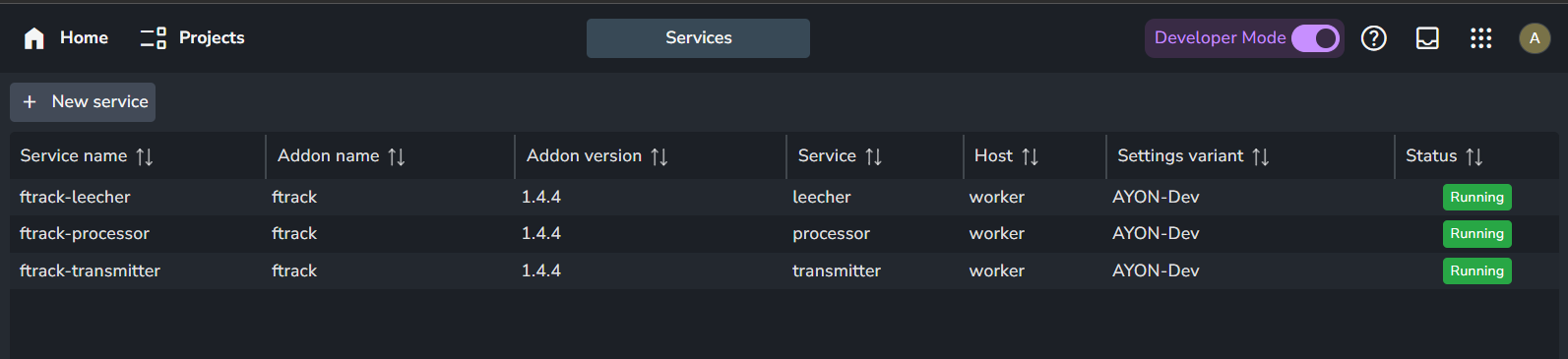
At this moment, ftrack addon include 3 services Leecher, Processor and transmitter There are prepared docker images for each process. We do recommend to use AYON Service Host (ASH) to be able to control them from AYON server web. In that case make sure you have a running ASH and create services in Services on server.
For more info, please refer to AYON Services and ASH.
ftrack services should be the same version as your ftrack addon version. If you already have a running ftrack services, you can simply Right-click, delete them and create new ones.
AYON Service Host (ASH) Recommendations for ftrack services
We recommend your ASH is run on a stable server machine with ability to connect to AYON server and ftrack web server.
The ASH machine can be Windows or Linux. For a well functioning ftrack services, we recommend a linux virtual server.
CPU and RAM allocation needs differ based on the studio size, but a 2GB of ram, with a dual core CPU and around 4GB of storage should suffice.
ftrack events
Events are helpers for automation. They react to ftrack Web Server events like change entity attribute, create of entity, etc.
Sync to AYON
Automatic synchronization to pipeline database.
This event updates entities on their changes ftrack. When new entity is created or existing entity is modified. Interface with listing information is shown to users when synchronization rules are not met. This event may also undo changes when they might break pipeline. Namely change name of synchronized entity, move synchronized entity in hierarchy.
Synchronize Hierarchical and Entity Attributes
Auto-synchronization of hierarchical attributes from ftrack entities.
Related to Synchronize to AYON database event (without it, it makes no sense to use this event). Hierarchical attributes must be synchronized with special way so we needed to split synchronization into 2 parts. There are synchronization rules for hierarchical attributes that must be met otherwise interface with messages about not meeting conditions is shown to user.
Update Hierarchy thumbnails
Push thumbnails from version, up through multiple hierarchy levels
Update status on task action
When launching an action on a task in ftrack, the status of the task can be updated. The mapping happens from the value to key, eg. if the key is Ready and the value is Not Ready, then the status will be updated to Ready if its Not Ready. The mapping happens on a first-come-first-serve basis, from the top to the bottom.
There are two special tokens that can be used; __any__ and __ignore__
__any__ - if this is in the value of a mapping, then any task status will be changed to the key (status) when launching an action. __ignore__ - if this is in the key of a mapping, then any status (case insensitive) in the values will be ignored for updating the task status.
By default any task status will be updated to In Progress when launching an action.
Sync status from Task to Parent
List of parent object types where this is triggered ("Shot", "Asset build", etc. Skipped if it is empty)
Sync status from Task to Asset Version
This will sync the status from the task to the latest asset version on the task.
Due to a potential infinite status update loop, the event server user and the user updating the task status, need to be different. If it is the same user, the status will not be synced.
Sync status from Version to Task
Updates Task status based on status changes on its Asset Version.
The issue this solves is when Asset version's status is changed but the artist assigned to Task is looking at the task status, thus not noticing the review.
This event makes sure statuses Asset Version get synced to it's task. After changing a status on version, this event first tries to set identical status to version's parent (usually task). But this behavior can be tweaked in settings.
Sync status on first created version
This event handler allows setting of different status to a first created Asset Version in ftrack.
This is useful for example if first version publish doesn't contain any actual reviewable work, but is only used for roundtrip conform check, in which case this version could receive status pending conform instead of standard pending review
Update status on next task
Change status on next task by task types order when task status state changed to "Done". All tasks with the same Task mapping of next task status changes From → To. Some status can be ignored.