Maya Publishers Settings
Last updated Over 1 year ago
Collectors
Collect Render Layers
Setting Location:
ayon+settings://maya/publish/CollectMayaRender

Sync render version with workfile
Collect FBX Animation
Setting Location:
ayon+settings://maya/publish/CollectFbxAnimation
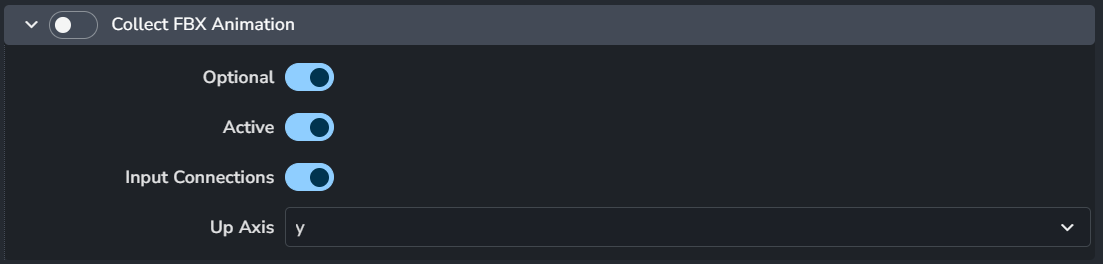
Enable: The default state of the plugin.
Optional: Allows the user to toggle this setting in the publisher UI.
Active: The default value of the toggle in the publisher UI.
Input Connections
Up Axis
Collect Camera for FBX export
Setting Location:
ayon+settings://maya/publish/CollectFbxCamera

Enable: The default state of the plugin.
Optional: Allows the user to toggle this setting in the publisher UI.
Active: The default value of the toggle in the publisher UI.
Collect Model for FBX export
Setting Location:
ayon+settings://maya/publish/CollectFbxModel

Enable: The default state of the plugin.
Optional: Allows the user to toggle this setting in the publisher UI.
Active: The default value of the toggle in the publisher UI.
Collect Assets for GLB/GLTF export
Setting Location:
ayon+settings://maya/publish/CollectGLTF

Enable: The default state of the plugin.
Maya USD Export Chaser: Filter Properties
Setting Location:
ayon+settings://maya/publish/CollectMayaUsdFilterProperties

Enable: The default state of the plugin.
Default Filter: Set the default filter for USD properties to export. It uses SideFX Houdini Pattern Matching in Parameters.
Some examples would include:
Only include xforms:
xformOp*Everything but xforms:
* ^xformOp*Everything but mesh point data:
* ^extent ^points ^faceVertexCounts ^faceVertexIndices ^primvars*
Validators
Validate Instance In Context
Setting Location:
ayon+settings://maya/publish/ValidateInstanceInContext

Enable: The default state of the plugin.
Optional: Allows the user to toggle this setting in the publisher UI.
Active: The default value of the toggle in the publisher UI.
Validate Frame Range
Setting Location:
ayon+settings://maya/publish/ValidateFrameRange
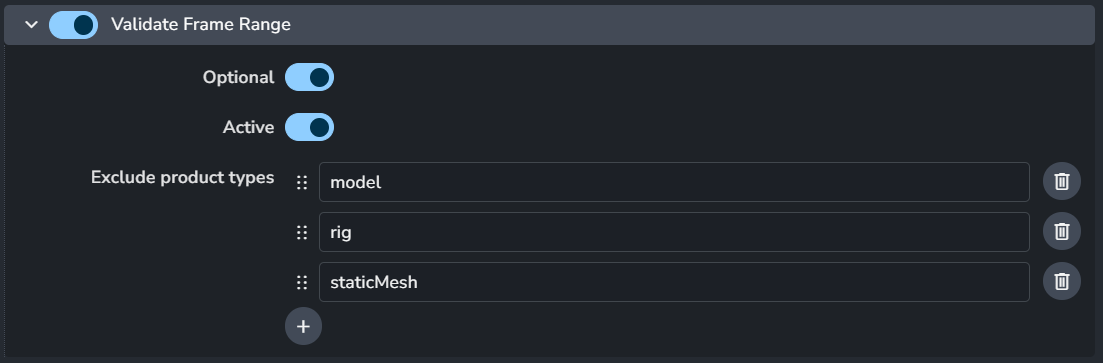
Enable: The default state of the plugin.
Optional: Allows the user to toggle this setting in the publisher UI.
Active: The default value of the toggle in the publisher UI.
Exclude product types
Validate Shader Name
Setting Location:
ayon+settings://maya/publish/ValidateShaderName

Shader name regex can use named capture group asset to validate against current asset name.
Enable: The default state of the plugin.
Optional: Allows the user to toggle this setting in the publisher UI.
Active: The default value of the toggle in the publisher UI.
Validation regex
This validator can enforce specific names for model members. It will check them against Validation Regex. There is special group in that regex - shader. If present, it will take that part of the name as shader name and it will compare it with list of shaders defined either in file name specified in Material File or from database file that is per project and can be directly edited from Maya's AYON Tools > Edit Shader name definitions when Use database shader name definitions is on. This list defines simply as one shader name per line.
Validate Look Shading Engine Naming
Setting Location:
ayon+settings://maya/publish/ValidateShadingEngine

Enable: The default state of the plugin.
Optional: Allows the user to toggle this setting in the publisher UI.
Active: The default value of the toggle in the publisher UI.
Validate Colorspace
Setting Location:
ayon+settings://maya/publish/ValidateMayaColorSpace

Enable: The default state of the plugin.
Optional: Allows the user to toggle this setting in the publisher UI.
Active: The default value of the toggle in the publisher UI.
Validate Attributes
Setting Location:
ayon+settings://maya/publish/ValidateAttributes
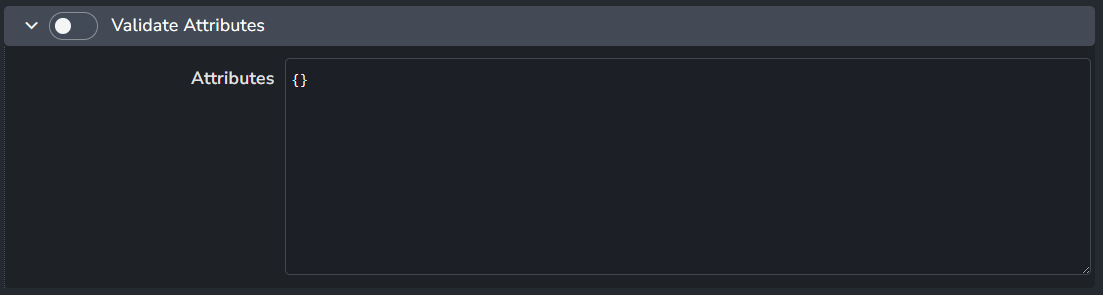
Enable: The default state of the plugin.
Attributes
Validate Loaded Plugin
Setting Location:
ayon+settings://maya/publish/ValidateLoadedPlugin

Enable: The default state of the plugin.
Optional: Allows the user to toggle this setting in the publisher UI.
Whitelist Maya Native Plugins
Authorized plugins
Validate Maya Units
Setting Location:
ayon+settings://maya/publish/ValidateMayaUnits
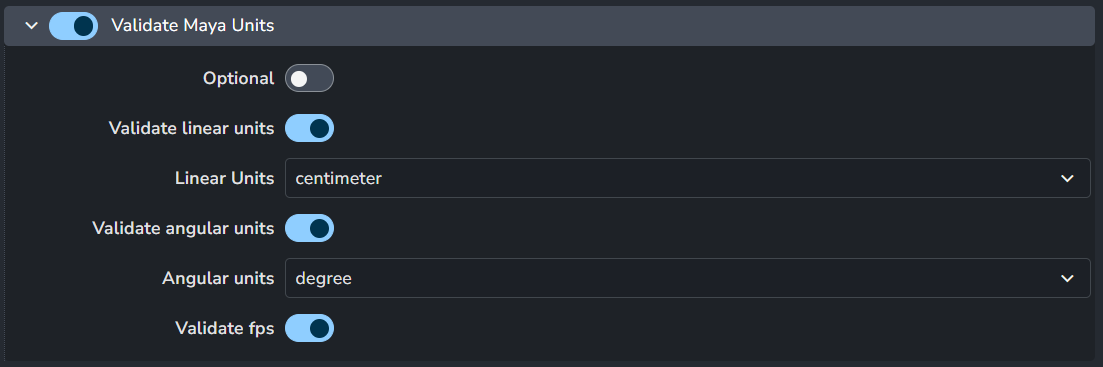
Enable: The default state of the plugin.
Optional: Allows the user to toggle this setting in the publisher UI.
Validate linear units
Linear Units
Validate angular units
Angular units
Validate fps
Validate Unreal Static Mesh Name
Setting Location:
ayon+settings://maya/publish/ValidateUnrealStaticMeshName

Enable: The default state of the plugin.
Optional: Allows the user to toggle this setting in the publisher UI.
Vaidate mesh names
Validate collision names
Validate Cycle Error
Setting Location:
ayon+settings://maya/publish/ValidateCycleError

Enable: The default state of the plugin.
Optional: Allows the user to toggle this setting in the publisher UI.
Families
Plug-in Path Attributes
Setting Location:
ayon+settings://maya/publish/ValidatePluginPathAttributes

Fill in the node types and attributes you want to validate. e.g. AlembicNode.abc_file, the node type is AlembicNode and the node attribute is abc_file.
Enable: The default state of the plugin.
Optional: Allows the user to toggle this setting in the publisher UI.
Active: The default value of the toggle in the publisher UI.
File Attribute
+ to add a file attribute
Each file attribute includes:

Node type
Attribute
Validate Render Settings
Setting Location:
ayon+settings://maya/publish/ValidateRenderSettings
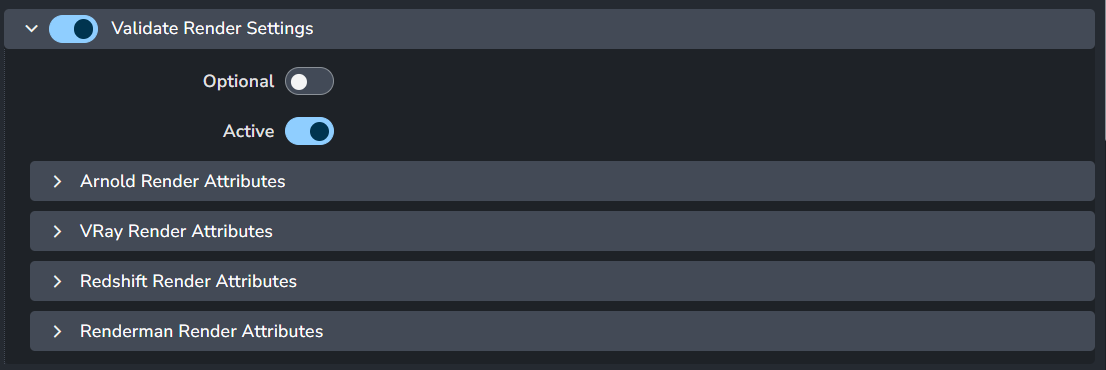
Enable: The default state of the plugin.
Optional: Allows the user to toggle this setting in the publisher UI.
Active: The default value of the toggle in the publisher UI.
Renderers attributes: It supports four renderes Arnold, Vray, Redshift and Renderman
each renderers attributes include:

Render Settings Validator is here to make sure artists will submit renders with the correct settings. Some of these settings are needed by AYON but some can be defined by the admin. For more information, see Working with settings .
AYON enforced settings include:
animation must be enabled in output
render prefix must start with
maya/<scene>to make sure renders are in correct directorythere must be
<renderlayer>or its equivalent in different renderers in file prefixif multiple cameras are to be rendered,
<camera>token must be in file prefix
For Vray:
AOV separator must be set to
_(underscore)
For Redshift:
all AOVs must follow
<BeautyPath>/<BeautyFile>_<RenderPass>image file prefixAOV image format must be same as the one set in Output settings
For Renderman:
both image and directory prefixes must comply to
<layer>_<aov>.<f4>.<ext>and<ws>/renders/maya/<scene>/<layer>respectively
For Arnold:
there shouldn't be
<renderpass>token when merge AOVs option is turned on
Additional check can be added via Settings - Project Settings > Maya > Publish plugin > ValidateRenderSettings. You can add as many options as you want for every supported renderer. In first field put node type and attribute and in the second required value. You can create multiple values for an attribute, but when repairing it'll be the first value in the list that get selected.
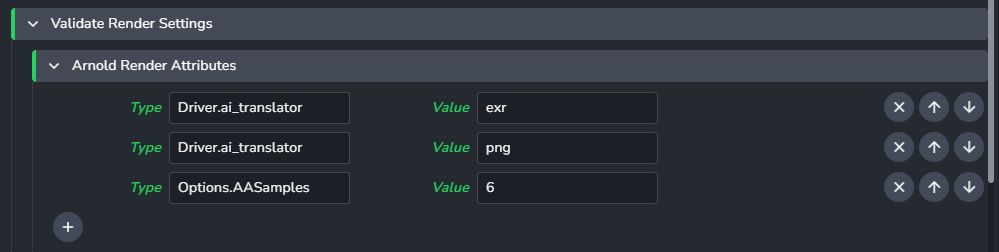
In this example we've put aiOptions.AA_samples in first one and 6 to second to enforce Arnolds Camera (AA) samples to 6.
Note that aiOptions is not the name of node but rather its type. For renderers there is usually just one instance of this node type but if that is not so, validator will go through all its instances and check the value there. Node type for VRay settings is VRaySettingsNode, for Renderman it is rmanGlobals, for Redshift it is RedshiftOptions.
Getting attribute values
If you do not know what an attributes value is supposed to be, for example for dropdown menu (enum), try changing the attribute and look in the script editor where it should log what the attribute was set to.
Validate Resolution Setting
Setting Location:
ayon+settings://maya/publish/ValidateResolution

Enable: The default state of the plugin.
Optional: Allows the user to toggle this setting in the publisher UI.
Active: The default value of the toggle in the publisher UI.
Validate Current Render Layer Has Renderable Camera
Setting Location:
ayon+settings://maya/publish/ValidateCurrentRenderLayerIsRenderable

Enable: The default state of the plugin.
Optional: Allows the user to toggle this setting in the publisher UI.
Active: The default value of the toggle in the publisher UI.
Validate GLSL Material
Setting Location:
ayon+settings://maya/publish/ValidateGLSLMaterial

Enable: The default state of the plugin.
Optional: Allows the user to toggle this setting in the publisher UI.
Active: The default value of the toggle in the publisher UI.
Validate GLSL Plugin
Setting Location:
ayon+settings://maya/publish/ValidateGLSLPlugin

Enable: The default state of the plugin.
Optional: Allows the user to toggle this setting in the publisher UI.
Active: The default value of the toggle in the publisher UI.
Validate Ornatrix Rig Content
Setting Location:
ayon+settings://maya/publish/ValidateOrnatrixRigContent

ensure only Ornatrix-related nodes are included.
Enable: The default state of the plugin.
Optional: Allows the user to toggle this setting in the publisher UI.
Active: The default value of the toggle in the publisher UI.
Validate Ornatrix Cache Content
Setting Location:
ayon+settings://maya/publish/ValidateOrnatrixCacheContent

ensure only Ornatrix-related nodes are included.
Enable: The default state of the plugin.
Optional: Allows the user to toggle this setting in the publisher UI.
Active: The default value of the toggle in the publisher UI.
Validate Render Image Rule (Workspace)
Setting Location:
ayon+settings://maya/publish/ValidateRenderImageRule

Enable: The default state of the plugin.
Optional: Allows the user to toggle this setting in the publisher UI.
Active: The default value of the toggle in the publisher UI.
Validate No Default Cameras Renderable
Setting Location:
ayon+settings://maya/publish/ValidateRenderNoDefaultCameras

Enable: The default state of the plugin.
Optional: Allows the user to toggle this setting in the publisher UI.
Active: The default value of the toggle in the publisher UI.
Validate Render Single Camera
Setting Location:
ayon+settings://maya/publish/ValidateRenderSingleCamera

Enable: The default state of the plugin.
Optional: Allows the user to toggle this setting in the publisher UI.
Active: The default value of the toggle in the publisher UI.
Validate Render Passes/AOVs Are Registered
Setting Location:
ayon+settings://maya/publish/ValidateRenderLayerAOVs

Enable: The default state of the plugin.
Optional: Allows the user to toggle this setting in the publisher UI.
Active: The default value of the toggle in the publisher UI.
Validate Step Size
Setting Location:
ayon+settings://maya/publish/ValidateStepSize

Enable: The default state of the plugin.
Optional: Allows the user to toggle this setting in the publisher UI.
Active: The default value of the toggle in the publisher UI.
VRay Distributed Rendering
Setting Location:
ayon+settings://maya/publish/ValidateVRayDistributedRendering

Enable: The default state of the plugin.
Optional: Allows the user to toggle this setting in the publisher UI.
Active: The default value of the toggle in the publisher UI.
VRay Referenced AOVs
Setting Location:
ayon+settings://maya/publish/ValidateVrayReferencedAOVs

Enable: The default state of the plugin.
Optional: Allows the user to toggle this setting in the publisher UI.
Active: The default value of the toggle in the publisher UI.
VRay Translator Settings
Setting Location:
ayon+settings://maya/publish/ValidateVRayTranslatorEnabled

Enable: The default state of the plugin.
Optional: Allows the user to toggle this setting in the publisher UI.
Active: The default value of the toggle in the publisher UI.
VRay Proxy Settings
Setting Location:
ayon+settings://maya/publish/ValidateVrayProxy

Enable: The default state of the plugin.
Optional: Allows the user to toggle this setting in the publisher UI.
Active: The default value of the toggle in the publisher UI.
VRay Proxy Members
Setting Location:
ayon+settings://maya/publish/ValidateVrayProxyMembers

Enable: The default state of the plugin.
Optional: Allows the user to toggle this setting in the publisher UI.
Active: The default value of the toggle in the publisher UI.
Yeti Render Script Callbacks
Setting Location:
ayon+settings://maya/publish/ValidateYetiRenderScriptCallbacks

Enable: The default state of the plugin.
Optional: Allows the user to toggle this setting in the publisher UI.
Active: The default value of the toggle in the publisher UI.
Yeti Rig Cache State
Setting Location:
ayon+settings://maya/publish/ValidateYetiRigCacheState

Enable: The default state of the plugin.
Optional: Allows the user to toggle this setting in the publisher UI.
Active: The default value of the toggle in the publisher UI.
Yeti Rig Input Shapes In Instance
Setting Location:
ayon+settings://maya/publish/ValidateYetiRigInputShapesInInstance

Enable: The default state of the plugin.
Optional: Allows the user to toggle this setting in the publisher UI.
Active: The default value of the toggle in the publisher UI.
Yeti Rig Settings
Setting Location:
ayon+settings://maya/publish/ValidateYetiRigSettings

Enable: The default state of the plugin.
Optional: Allows the user to toggle this setting in the publisher UI.
Active: The default value of the toggle in the publisher UI.
Model Validators
Validate Model Content
Setting Location:
ayon+settings://maya/publish/ValidateModelContent

Ensure single top group. A model instance must have exactly one top group.
Enable: The default state of the plugin.
Optional: Allows the user to toggle this setting in the publisher UI.
Validate one top group
Validate Transform Naming Suffix
Setting Location:
ayon+settings://maya/publish/ValidateTransformNamingSuffix
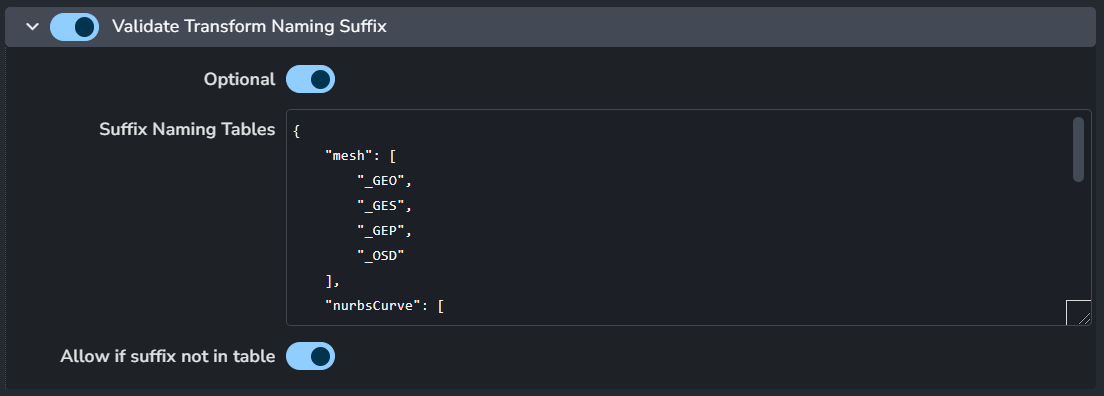
Validates transform suffix based on the type of its children shapes.
Enable: The default state of the plugin.
Optional: Allows the user to toggle this setting in the publisher UI.
Suffix Naming Tables
Allow if suffix not in table
Validate Color Sets
Setting Location:
ayon+settings://maya/publish/ValidateColorSets

Enable: The default state of the plugin.
Optional: Allows the user to toggle this setting in the publisher UI.
Active: The default value of the toggle in the publisher UI.
Validate Mesh Has Overlapping UVs
Setting Location:
ayon+settings://maya/publish/ValidateMeshHasOverlappingUVs

Enable: The default state of the plugin.
Optional: Allows the user to toggle this setting in the publisher UI.
Active: The default value of the toggle in the publisher UI.
Validate Mesh Arnold Attributes
Setting Location:
ayon+settings://maya/publish/ValidateMeshArnoldAttributes

Enable: The default state of the plugin.
Optional: Allows the user to toggle this setting in the publisher UI.
Active: The default value of the toggle in the publisher UI.
Validate Mesh Shader Connections
Setting Location:
ayon+settings://maya/publish/ValidateMeshShaderConnections

Enable: The default state of the plugin.
Optional: Allows the user to toggle this setting in the publisher UI.
Active: The default value of the toggle in the publisher UI.
Validate Mesh Single UV Set
Setting Location:
ayon+settings://maya/publish/ValidateMeshSingleUVSet

Enable: The default state of the plugin.
Optional: Allows the user to toggle this setting in the publisher UI.
Active: The default value of the toggle in the publisher UI.
Validate Mesh Has UVs
Setting Location:
ayon+settings://maya/publish/ValidateMeshHasUVs

Enable: The default state of the plugin.
Optional: Allows the user to toggle this setting in the publisher UI.
Active: The default value of the toggle in the publisher UI.
Validate Mesh Lamina Faces
Setting Location:
ayon+settings://maya/publish/ValidateMeshLaminaFaces

Enable: The default state of the plugin.
Optional: Allows the user to toggle this setting in the publisher UI.
Active: The default value of the toggle in the publisher UI.
Validate Mesh Ngons
Setting Location:
ayon+settings://maya/publish/ValidateMeshNgons

Enable: The default state of the plugin.
Optional: Allows the user to toggle this setting in the publisher UI.
Active: The default value of the toggle in the publisher UI.
Validate Mesh Non-Manifold
Setting Location:
ayon+settings://maya/publish/ValidateMeshNonManifold

Enable: The default state of the plugin.
Optional: Allows the user to toggle this setting in the publisher UI.
Active: The default value of the toggle in the publisher UI.
Validate Mesh No Negative Scale
Setting Location:
ayon+settings://maya/publish/ValidateMeshNoNegativeScale

Enable: The default state of the plugin.
Optional: Allows the user to toggle this setting in the publisher UI.
Active: The default value of the toggle in the publisher UI.
Validate Mesh Edge Length Non Zero
Setting Location:
ayon+settings://maya/publish/ValidateMeshNonZeroEdgeLength

Enable: The default state of the plugin.
Optional: Allows the user to toggle this setting in the publisher UI.
Active: The default value of the toggle in the publisher UI.
Validate Mesh Normals Unlocked
Setting Location:
ayon+settings://maya/publish/ValidateMeshNormalsUnlocked

Enable: The default state of the plugin.
Optional: Allows the user to toggle this setting in the publisher UI.
Active: The default value of the toggle in the publisher UI.
Validate Mesh UV Set Map 1
Setting Location:
ayon+settings://maya/publish/ValidateMeshUVSetMap1

Validate model's default uv set exists and is named map1.
Enable: The default state of the plugin.
Optional: Allows the user to toggle this setting in the publisher UI.
Active: The default value of the toggle in the publisher UI.
Validate Mesh Vertices Have Edges
Setting Location:
ayon+settings://maya/publish/ValidateMeshVerticesHaveEdges

Enable: The default state of the plugin.
Optional: Allows the user to toggle this setting in the publisher UI.
Active: The default value of the toggle in the publisher UI.
Validate No Animation
Setting Location:
ayon+settings://maya/publish/ValidateNoAnimation

Ensure no keyframes on nodes in the Instance.
Enable: The default state of the plugin.
Optional: Allows the user to toggle this setting in the publisher UI.
Active: The default value of the toggle in the publisher UI.
Validate No Namespace
Setting Location:
ayon+settings://maya/publish/ValidateNoNamespace

Enable: The default state of the plugin.
Optional: Allows the user to toggle this setting in the publisher UI.
Active: The default value of the toggle in the publisher UI.
Validate No Null Transforms
Setting Location:
ayon+settings://maya/publish/ValidateNoNullTransforms

Enable: The default state of the plugin.
Optional: Allows the user to toggle this setting in the publisher UI.
Active: The default value of the toggle in the publisher UI.
Validate No Unknown Nodes
Setting Location:
ayon+settings://maya/publish/ValidateNoUnknownNodes

Enable: The default state of the plugin.
Optional: Allows the user to toggle this setting in the publisher UI.
Active: The default value of the toggle in the publisher UI.
Validate Node No Ghosting
Setting Location:
ayon+settings://maya/publish/ValidateNodeNoGhosting

Enable: The default state of the plugin.
Optional: Allows the user to toggle this setting in the publisher UI.
Active: The default value of the toggle in the publisher UI.
Validate Shape Default Names
Setting Location:
ayon+settings://maya/publish/ValidateShapeDefaultNames

Enable: The default state of the plugin.
Optional: Allows the user to toggle this setting in the publisher UI.
Active: The default value of the toggle in the publisher UI.
Validate Shape Render Stats
Setting Location:
ayon+settings://maya/publish/ValidateShapeRenderStats

Enable: The default state of the plugin.
Optional: Allows the user to toggle this setting in the publisher UI.
Active: The default value of the toggle in the publisher UI.
Validate Shape Zero
Setting Location:
ayon+settings://maya/publish/ValidateShapeZero

Enable: The default state of the plugin.
Optional: Allows the user to toggle this setting in the publisher UI.
Active: The default value of the toggle in the publisher UI.
Validate Transform Zero
Setting Location:
ayon+settings://maya/publish/ValidateTransformZero

Enable: The default state of the plugin.
Optional: Allows the user to toggle this setting in the publisher UI.
Active: The default value of the toggle in the publisher UI.
Validate Unique Names
Setting Location:
ayon+settings://maya/publish/ValidateUniqueNames

Enable: The default state of the plugin.
Optional: Allows the user to toggle this setting in the publisher UI.
Active: The default value of the toggle in the publisher UI.
Validate No V-Ray Proxies (VRayMesh)
Setting Location:
ayon+settings://maya/publish/ValidateNoVRayMesh

Enable: The default state of the plugin.
Optional: Allows the user to toggle this setting in the publisher UI.
Active: The default value of the toggle in the publisher UI.
Validate if Mesh is Triangulated
Setting Location:
ayon+settings://maya/publish/ValidateUnrealMeshTriangulated

Enable: The default state of the plugin.
Optional: Allows the user to toggle this setting in the publisher UI.
Active: The default value of the toggle in the publisher UI.
Validate Alembic Visible Node
Setting Location:
ayon+settings://maya/publish/ValidateAlembicVisibleOnly

Enable: The default state of the plugin.
Optional: Allows the user to toggle this setting in the publisher UI.
Active: The default value of the toggle in the publisher UI.
Validate Alembic Defaults Pointcache
Setting Location:
ayon+settings://maya/publish/ValidateAlembicDefaultsPointcache

Enable: The default state of the plugin.
Optional: Allows the user to toggle this setting in the publisher UI.
Active: The default value of the toggle in the publisher UI.
Validate Alembic Defaults Animation
Setting Location:
ayon+settings://maya/publish/ValidateAlembicDefaultsAnimation

Enable: The default state of the plugin.
Optional: Allows the user to toggle this setting in the publisher UI.
Active: The default value of the toggle in the publisher UI.
Model Extractors
Extract Proxy Alembic
Setting Location:
ayon+settings://maya/publish/ExtractProxyAlembic

Enable: The default state of the plugin.
Families
Extract OBJ
Setting Location:
ayon+settings://maya/publish/ExtractObj

Enable: The default state of the plugin.
Optional: Allows the user to toggle this setting in the publisher UI.
Rig Validators
Validate Rig Contents
Setting Location:
ayon+settings://maya/publish/ValidateRigContents

Enable: The default state of the plugin.
Optional: Allows the user to toggle this setting in the publisher UI.
Active: The default value of the toggle in the publisher UI.
Validate Rig Joints Hidden
Setting Location:
ayon+settings://maya/publish/ValidateRigJointsHidden

Enable: The default state of the plugin.
Optional: Allows the user to toggle this setting in the publisher UI.
Active: The default value of the toggle in the publisher UI.
Validate Rig Controllers
Setting Location:
ayon+settings://maya/publish/ValidateRigControllers

Enable: The default state of the plugin.
Optional: Allows the user to toggle this setting in the publisher UI.
Active: The default value of the toggle in the publisher UI.
Validate Animation Content
Setting Location:
ayon+settings://maya/publish/ValidateAnimationContent

Enable: The default state of the plugin.
Optional: Allows the user to toggle this setting in the publisher UI.
Active: The default value of the toggle in the publisher UI.
Validate Animation Out Set Related Node Ids
Setting Location:
ayon+settings://maya/publish/ValidateOutRelatedNodeIds

Enable: The default state of the plugin.
Optional: Allows the user to toggle this setting in the publisher UI.
Active: The default value of the toggle in the publisher UI.
Validate Animation Product Type Publish
Setting Location:
ayon+settings://maya/publish/ValidateAnimationProductTypePublish

Enable: The default state of the plugin.
Optional: Allows the user to toggle this setting in the publisher UI.
Active: The default value of the toggle in the publisher UI.
Validate Rig Controllers (Arnold Attributes)
Setting Location:
ayon+settings://maya/publish/ValidateRigControllersArnoldAttributes

Enable: The default state of the plugin.
Optional: Allows the user to toggle this setting in the publisher UI.
Active: The default value of the toggle in the publisher UI.
Validate Single Assembly
Setting Location:
ayon+settings://maya/publish/ValidateSingleAssembly

Enable: The default state of the plugin.
Optional: Allows the user to toggle this setting in the publisher UI.
Active: The default value of the toggle in the publisher UI.
Validate Animated Rig Content
Setting Location:
ayon+settings://maya/publish/ValidateAnimatedRigContent

Enable: The default state of the plugin.
Optional: Allows the user to toggle this setting in the publisher UI.
Active: The default value of the toggle in the publisher UI.
Validate Skeletal Mesh Top Node
Setting Location:
ayon+settings://maya/publish/ValidateSkeletalMeshHierarchy

Enable: The default state of the plugin.
Optional: Allows the user to toggle this setting in the publisher UI.
Active: The default value of the toggle in the publisher UI.
Validate Skeleton Rig Contents
Setting Location:
ayon+settings://maya/publish/ValidateSkeletonRigContents

Enable: The default state of the plugin.
Optional: Allows the user to toggle this setting in the publisher UI.
Active: The default value of the toggle in the publisher UI.
Validate Skeleton Rig Controllers
Setting Location:
ayon+settings://maya/publish/ValidateSkeletonRigControllers

Enable: The default state of the plugin.
Optional: Allows the user to toggle this setting in the publisher UI.
Active: The default value of the toggle in the publisher UI.
Validate Skincluster Deformer Relationships
Setting Location:
ayon+settings://maya/publish/ValidateSkinclusterDeformerSet

Enable: The default state of the plugin.
Optional: Allows the user to toggle this setting in the publisher UI.
Active: The default value of the toggle in the publisher UI.
Validate Skeleton Rig Output Ids
Setting Location:
ayon+settings://maya/publish/ValidateSkeletonRigOutputIds

Enable: The default state of the plugin.
Optional: Allows the user to toggle this setting in the publisher UI.
Active: The default value of the toggle in the publisher UI.
Validate Skeleton Top Group Hierarchy
Setting Location:
ayon+settings://maya/publish/ValidateSkeletonTopGroupHierarchy

Enable: The default state of the plugin.
Optional: Allows the user to toggle this setting in the publisher UI.
Active: The default value of the toggle in the publisher UI.
Validate Rig Out Set Node Ids
Setting Location:
ayon+settings://maya/publish/ValidateRigOutSetNodeIds

Enable: The default state of the plugin.
Optional: Allows the user to toggle this setting in the publisher UI.
Allow history only
Validate Skeleton Rig Out Set Node Ids
Setting Location:
ayon+settings://maya/publish/ValidateSkeletonRigOutSetNodeIds

Enable: The default state of the plugin.
Optional: Allows the user to toggle this setting in the publisher UI.
Allow history only
Validate Camera Attributes
Setting Location:
ayon+settings://maya/publish/ValidateCameraAttributes

Enable: The default state of the plugin.
Optional: Allows the user to toggle this setting in the publisher UI.
Active: The default value of the toggle in the publisher UI.
Validate Assembly Name
Setting Location:
ayon+settings://maya/publish/ValidateAssemblyName

Enable: The default state of the plugin.
Optional: Allows the user to toggle this setting in the publisher UI.
Active: The default value of the toggle in the publisher UI.
Validate Assembly Namespaces
Setting Location:
ayon+settings://maya/publish/ValidateAssemblyNamespaces

Enable: The default state of the plugin.
Optional: Allows the user to toggle this setting in the publisher UI.
Active: The default value of the toggle in the publisher UI.
Validate Assembly Model Transforms
Setting Location:
ayon+settings://maya/publish/ValidateAssemblyModelTransforms

Enable: The default state of the plugin.
Optional: Allows the user to toggle this setting in the publisher UI.
Active: The default value of the toggle in the publisher UI.
Validate Ass Relative Paths
Setting Location:
ayon+settings://maya/publish/ValidateAssRelativePaths

Enable: The default state of the plugin.
Optional: Allows the user to toggle this setting in the publisher UI.
Active: The default value of the toggle in the publisher UI.
Validate No Default Cameras
Setting Location:
ayon+settings://maya/publish/ValidateNoDefaultCameras

Enable: The default state of the plugin.
Optional: Allows the user to toggle this setting in the publisher UI.
Active: The default value of the toggle in the publisher UI.
Validate Unreal Up-Axis Check
Setting Location:
ayon+settings://maya/publish/ValidateUnrealUpAxis

Enable: The default state of the plugin.
Optional: Allows the user to toggle this setting in the publisher UI.
Active: The default value of the toggle in the publisher UI.
Validate Camera Content
Setting Location:
ayon+settings://maya/publish/ValidateCameraContents

Enable: The default state of the plugin.
Optional: Allows the user to toggle this setting in the publisher UI.
Validate presense of shapes
Extractors
Extract Playblast Settings
Setting Location:
ayon+settings://maya/publish/ExtractPlayblast
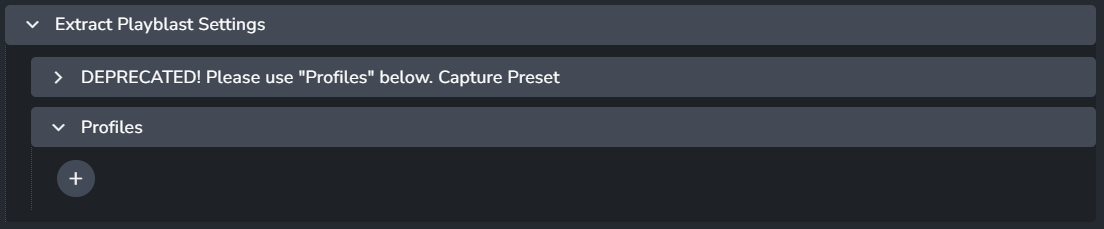
Profiles
+ : Add a profile.
Each profile includes:
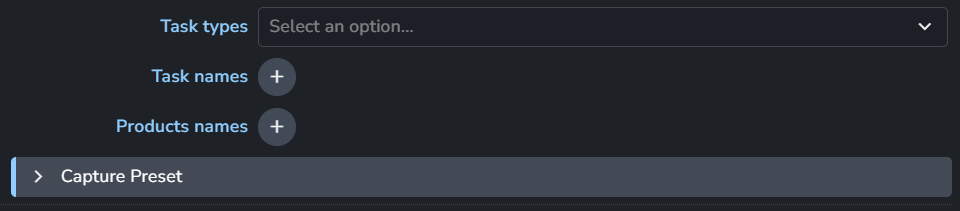
Task types
Task names
Products names
Capture Preset
Codec
Display Options
Generic
Renderer
Resolution
Viewer Options
Depth of field, Anit-Aliasing and etc
Camera Options
Maya Scene(Raw)
Setting Location:
ayon+settings://maya/publish/ExtractMayaSceneRaw

Add loaded instances to the specified published product types (families).
Enable: The default state of the plugin.
Families
Extract Camera Alembic
Setting Location:
ayon+settings://maya/publish/ExtractCameraAlembic
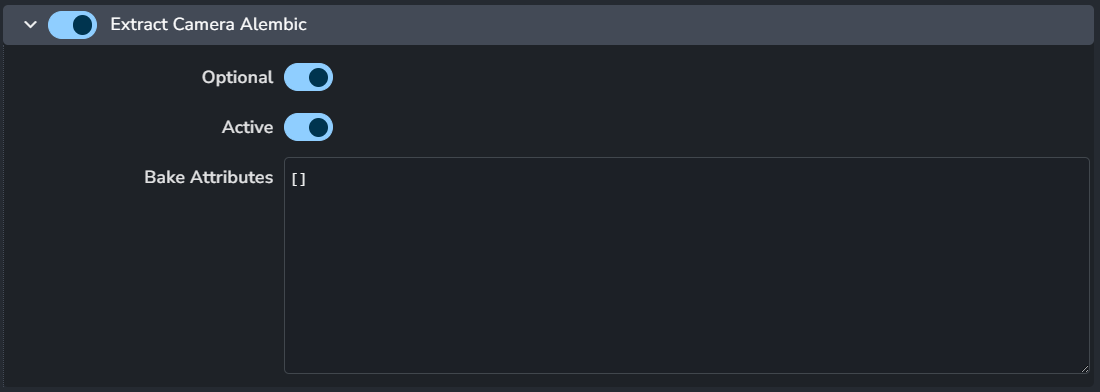
Enable: The default state of the plugin.
Optional: Allows the user to toggle this setting in the publisher UI.
Active: The default value of the toggle in the publisher UI.
Bake Attributes
Extract GLB
Setting Location:
ayon+settings://maya/publish/ExtractGLB

Enable: The default state of the plugin.
Active: The default value of the toggle in the publisher UI.
GLSL Shader Directory
Extract Look
Setting Location:
ayon+settings://maya/publish/ExtractLook

+ : Add an extra argument got maketx command line.
Extra argument for maketx command line
Each argument includes:
Argument
Parameters
Extract GPU Cache
Setting Location:
ayon+settings://maya/publish/ExtractGPUCache
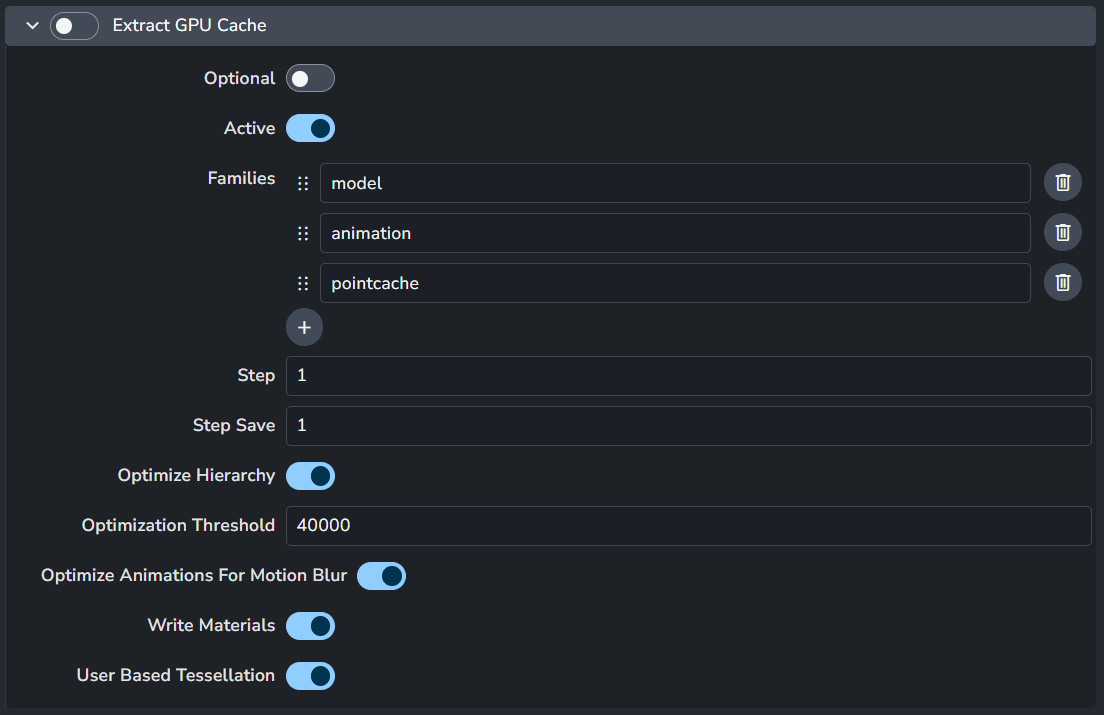
Enable: The default state of the plugin.
Optional: Allows the user to toggle this setting in the publisher UI.
Active: The default value of the toggle in the publisher UI.
Families
Step
Step Save
Optimize Hierarchy
Optimization Threshold
Optimize Animations For Motion Blur
Write MAterials
User Based Tessellation
Extract Model (Maya Scene)
Setting Location:
ayon+settings://maya/publish/ExtractModel

Enable: The default state of the plugin.
Optional: Allows the user to toggle this setting in the publisher UI.
Active: The default value of the toggle in the publisher UI.
Extract Alembic
Setting Location:
ayon+settings://maya/publish/ExtractAlembic
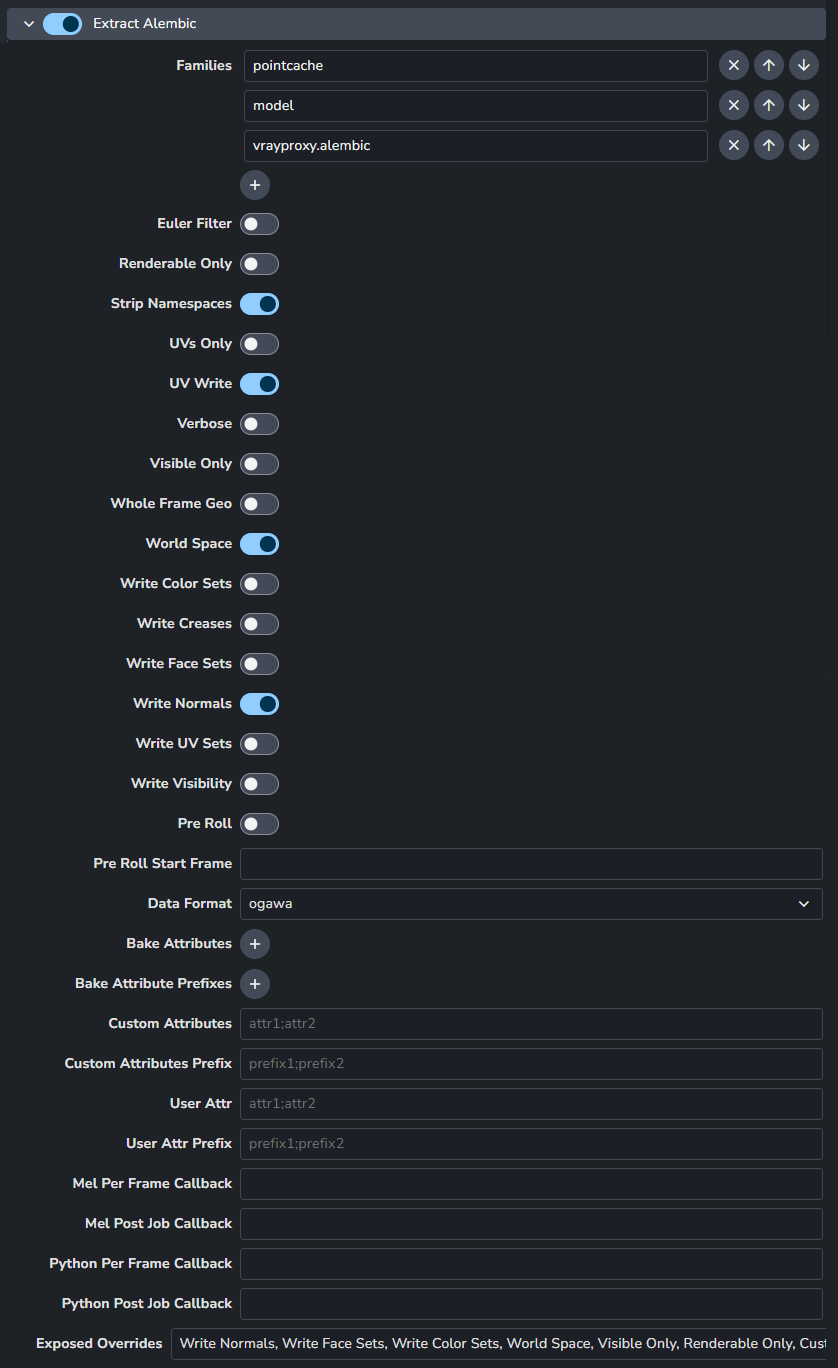
The settings below will become the default when extracting the alembics for pointcache and animation. Any attributes exposed in Exposed Overrides will be visible to the users to edit when publishing. When a user edits an attribute, the default settings below no longer has any effects on the publishing values. To enforce settings even when exposing attributes, you can utilize the validators; ValidateAlembicDefaultsPointcache and ValidateAlembicDefaultsAnimation.
Euler Filter: Apply Euler filter while sampling rotations.
Renderable Only: Only export renderable visible shapes.
Strip Namespaces: Namespaces will be stripped off of the node before being written to Alembic.
UVs Only: If this flag is present, only uv data for PolyMesh and SubD shapes will be written to the Alembic file.
UV Write: UV data for PolyMesh and SubD shapes will be written to the Alembic file.
Verbose: Prints the current frame that is being evaluated.
Visible Only: Only export dag objects visible during frame range.
Whole Frame Geo: Data for geometry will only be written out on whole frames.
World Space: Any root nodes will be stored in world space.
Write Color Sets: Write vertex colors with the geometry.
Write Face Sets: Write face sets with the geometry.
Write Normals: Write normals with the deforming geometry.
Write UV Sets: Write all uv sets on MFnMeshes as vector 2 indexed geometry parameters with face varying scope.
Write Visibility: Visibility state will be stored in the Alembic file. Otherwise everything written out is treated as visible.
Pre Roll: When enabled, the pre roll start frame is used to pre roll the evaluation of the mesh. From the pre roll start frame to the Alembic start frame, will not be written to disk. This can be used for simulation run-up.
Pre Roll Start Frame: The frame to start scene evaluation at. This is used to set the starting frame for time-dependent translations and can be used to evaluate run-up that isn't actually translated. NOTE: Pre Roll needs to be enabled for this start frame to be considered.
Data Format: The data format to use to write the file.
Bake Attributes: List of attributes that will be included in the Alembic export.
Bake Attribute Prefixes: List of attribute prefixes for attributes that will be included in the Alembic export.
Custom Attributes: Attributes matching by name will be included in the Alembic export. Attributes should be separated by semi-colon ;.
Custom Attributes Prefix: Attributes starting with these prefixes will be included in the Alembic export. Attributes should be separated by semi-colon ;.
User Attr: Attributes matching by name will be included in the Alembic export. Attributes should be separated by semi-colon ;.
User Attr Prefix: Attributes starting with these prefixes will be included in the Alembic export. Attributes should be separated by semi-colon ;.
Mel Per Frame Callback: When each frame (and the static frame) is evaluated the string specified is evaluated as a Mel command.
Mel Post Job Callback: When the translation has finished the string specified is evaluated as a Mel command.
Python Per Frame Callback: When each frame (and the static frame) is evaluated the string specified is evaluated as a python command.
Python Post Job Callback: When the translation has finished the string specified is evaluated as a python command.
Exposed Overrides: These are the attributes from above that will be exposed in the publisher for users to edit when publishing.
Extract Animation (Alembic)
Setting Location:
ayon+settings://maya/publish/ExtractAnimation

Alembic extractor for loaded rigs.
Enable: The default state of the plugin.
Optional: Allows the user to toggle this setting in the publisher UI.
Active: The default value of the toggle in the publisher UI.
Extract Maya USD with Model
Setting Location:
ayon+settings://maya/publish/ExtractMayaUsdModel

Enable: The default state of the plugin.
Optional: Allows the user to toggle this setting in the publisher UI.
Active: The default value of the toggle in the publisher UI.
Extract Maya USD with Pointcache
Setting Location:
ayon+settings://maya/publish/ExtractMayaUsdPointcache

Enable: The default state of the plugin.
Optional: Allows the user to toggle this setting in the publisher UI.
Active: The default value of the toggle in the publisher UI.
Extract Maya USD with Animation
Setting Location:
ayon+settings://maya/publish/ExtractMayaUsdAnim

Enable: The default state of the plugin.
Optional: Allows the user to toggle this setting in the publisher UI.
Active: The default value of the toggle in the publisher UI.
Extract Skeleton Mesh
Setting Location:
ayon+settings://maya/publish/ExtractSkeletonMesh

Enable: The default state of the plugin.
Optional: Allows the user to toggle this setting in the publisher UI.
Active: The default value of the toggle in the publisher UI.